
Adding On-Demand Image Generation to a Web App: 113 Real Requests, Latency Numbers and the Integration We Shipped
Our team is three developers building a small community app for home cooks. Users create recipe collections, get an avatar, and every collection needs a cover. For a year we shipped grey boxes. Last week we finally wired an image model into the backend, and before turning it on for real users I wanted numbers rather than impressions: how long a user waits, what happens when twenty people click "generate" at the same moment, which parameters actually change the output, and what a thousand images cost.
So I spent an afternoon sending 119 requests to FLUX 3 Image Klein, the small, open-weights member of the FLUX 3 Image family. 113 produced images, six were deliberately invalid, and the whole session cost $0.84. Here is what we measured.
Why a small model for this job
Placeholder art, avatars and blog thumbnails do not need the best image model on the market. They need to be quick, cheap, predictable and good enough at a glance. The model page documents five resolution tiers with flat per-image prices: 768sq at $0.008, 1k at $0.009, 1.5k at $0.011, 2k at $0.014 and 4k at $0.036. Aspect ratio, steps, seed, output format and the number of reference images do not change the price. Our account has a member discount, so each 1k image was billed $0.0072, reported in the task's cost field.
The API is asynchronous: you submit a job, get a task ID, and poll until the result URL appears.
Test 1: a fixed prompt set our app actually needs
I wrote twelve prompts that mirror real product slots: three avatars, three page backgrounds, three blog thumbnails with a short title, and three placeholders (a product shot, an empty-state illustration and a hero image). Each had four to six checkable requirements, such as "laptop on the left third", "exactly two colors" or "the words CACHE FIRST at the top". All twelve ran at 1k with seed 1234, one after another.
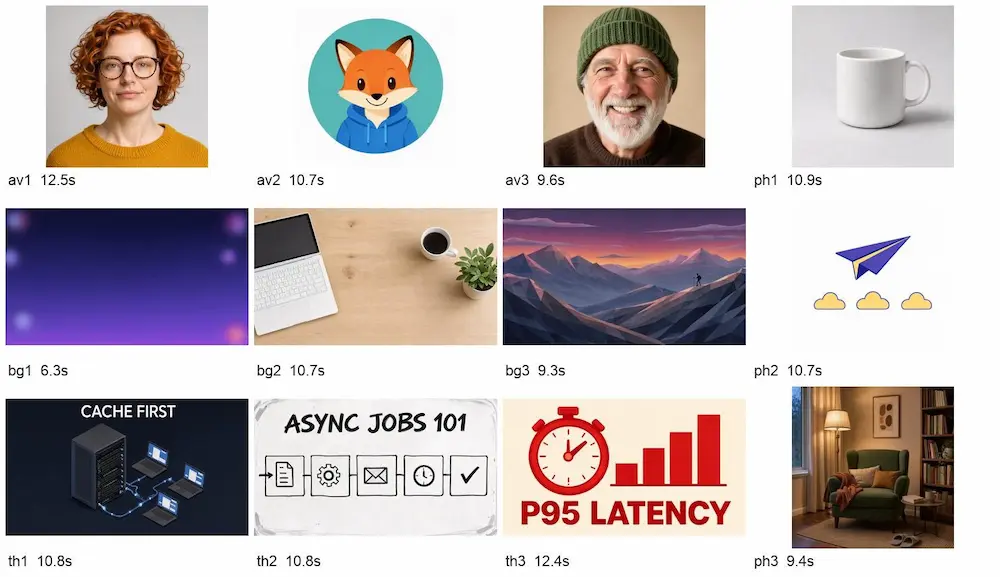
I scored 57 of 58 requirements as met. The one miss was the hiker in the low-poly mountain scene, who was asked to stand "on the right side" and ended up just right of centre. All three thumbnail titles were spelled correctly on the first try, including "P95 LATENCY" and "ASYNC JOBS 101". Short in-image text is where cheap models used to fall apart, so that surprised me. For our fixed category titles it works.
Test 2: latency and concurrency
I timed every 1k text-to-image job from the moment the POST left my machine until the image URL was available, polling once per second. Then I fired bursts of 5, 10, 20 and 40 requests at the same time.
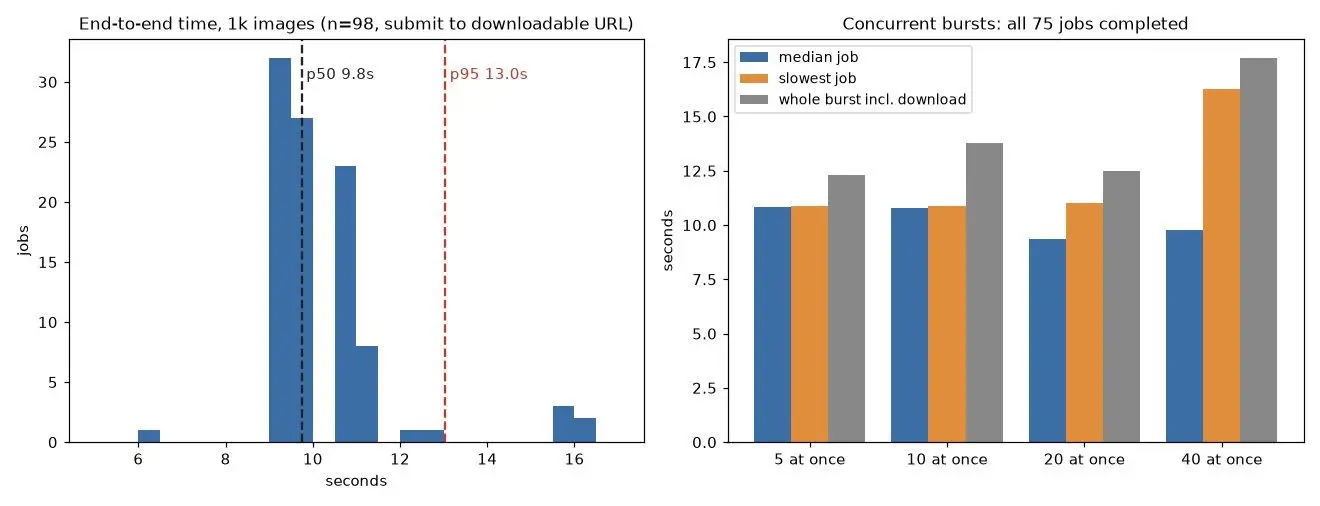
Across 98 jobs the median was 9.8 seconds, p90 was 11.3 seconds and p95 was 13.0 seconds. The fastest was 6.4 seconds and the slowest 16.3. The submit call itself returned the task ID in about 0.66 seconds. Concurrency barely mattered up to 20 parallel jobs: the slowest of 20 finished in 11.0 seconds. At 40 the median stayed at 9.8 seconds, but five jobs stretched to about 16 seconds, and the whole burst, including downloading 40 files, took 17.7 seconds. All 75 burst jobs completed. I saw zero failed tasks, zero rate-limit responses and zero polling errors in the entire session, so I cannot report a real-world retry rate yet; the retry logic below is there for the day it happens.
Ten seconds is too long for a blocking spinner but fine for a background job with a placeholder that swaps itself out.
Test 3: documented parameters vs delivered files
I ran one prompt with seed 42 through every tier and seven aspect ratios, then checked the pixel dimensions of each file. I also sent six invalid requests on purpose.
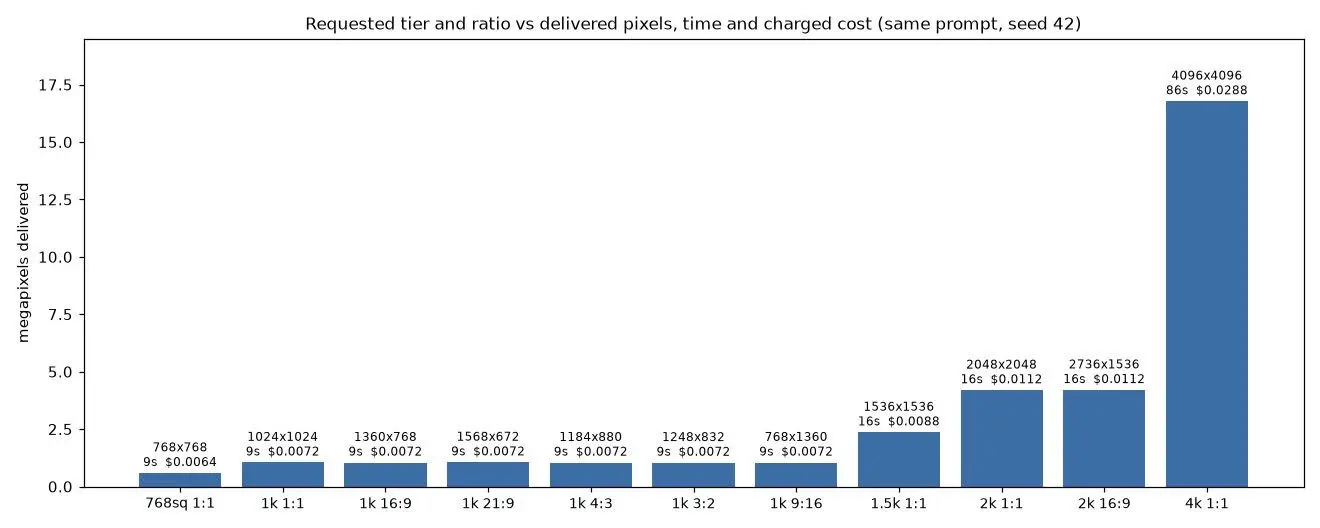
Every tier delivered what the FLUX 3 Image Klein API documentation promised. 768sq gave 768×768, 1k gave about one megapixel in every ratio (1024×1024, 1360×768 for 16:9, 1568×672 for 21:9, 768×1360 for 9:16), 1.5k gave 1536×1536, 2k gave 2048×2048 or 2736×1536, and 4k gave 4096×4096. Time is where the tiers differ: 1k and below took about 9 seconds, 1.5k and 2k about 16, and the single 4k image took 86 seconds and weighed 3.5 MB. JPEG is the default; the same 1k image as PNG was 1.3 MB instead of 389 KB, so we stay on JPEG and transcode to WebP ourselves.
The six bad requests all failed fast with HTTP 400 and a clear message: a pixel size like "1024x1024" as the aspect ratio, output_format "webp", steps of 0 and 17, a "3k" tier, and a width field. None of them created a task or cost anything.
Test 4: do fewer steps buy speed?
The steps parameter runs from 1 to 16 (default 16) and, according to the docs, does not change the price. I tried 2, 4 and 8 steps on three prompts with a fixed seed.
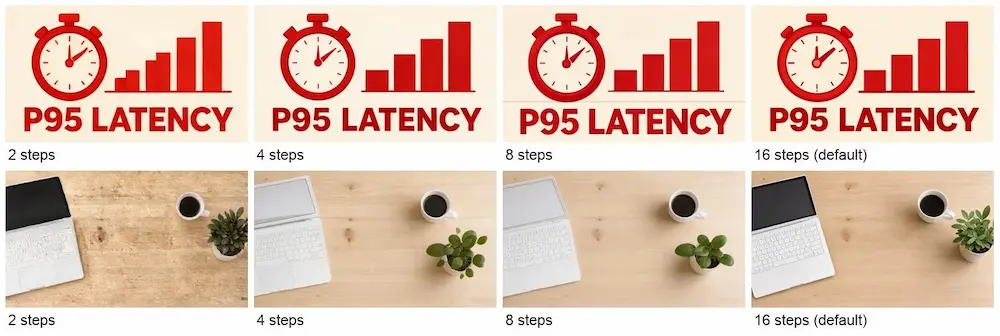
Honestly, the speed gain disappeared into queue noise. Median end-to-end times were 7.8 seconds at 2 steps, 6.2 at 4, 7.7 at 8 and 12.4 at 16, with a 6-second spread inside each group. Quality did change. At 2 steps the desk scene came out grainy and the thumbnail grew a fifth bar when the prompt asked for four. At 4 and 8 steps the results were clean and the layout already matched the 16-step version. We use 8 steps for live previews and keep 16 for the final cover.
Test 5: seed reproducibility and a quick edit
Caching relies on determinism, so I sent the avatar prompt with seed 1234 two more times. The first repeat was pixel-identical to the original. The second kept the same face, pose and framing but redrew details like individual strands of hair and the sweater knit, with about a third of the pixels shifting noticeably. A fixed seed gives the same composition, not a guaranteed identical file, so store the bytes you showed the user.
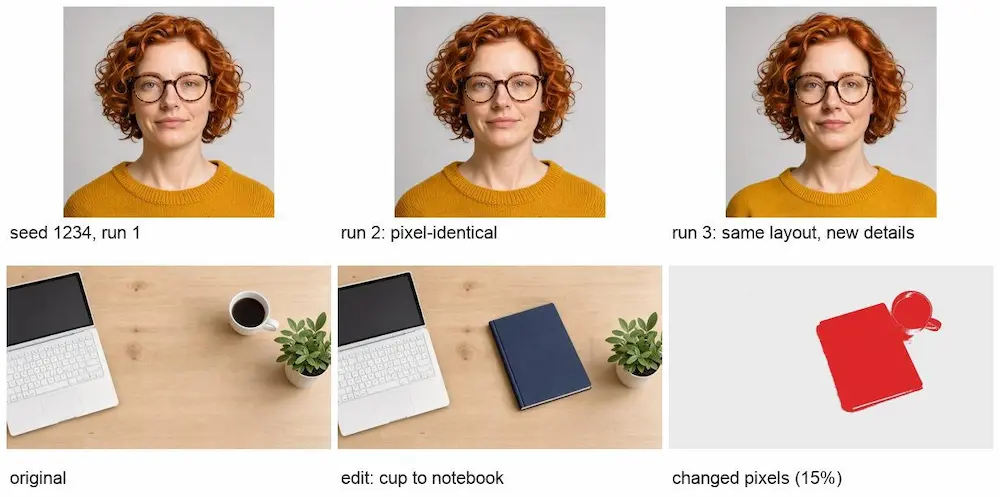
I also sent the desk background back as a Base64 reference and asked for the cup to be replaced with a dark blue notebook. That took 21 seconds and cost the same $0.0072. 15% of pixels changed, but only 0.6% outside the edited area, so the laptop and plant stayed put. The notebook came out larger than the cup and moved left, and the output was 1363×770 rather than exactly the 1360×768 input, so resize before comparing or compositing.
The integration we kept
This is the core of our work. It validates locally, submits, polls with a deadline and retries only on errors that are worth retrying.
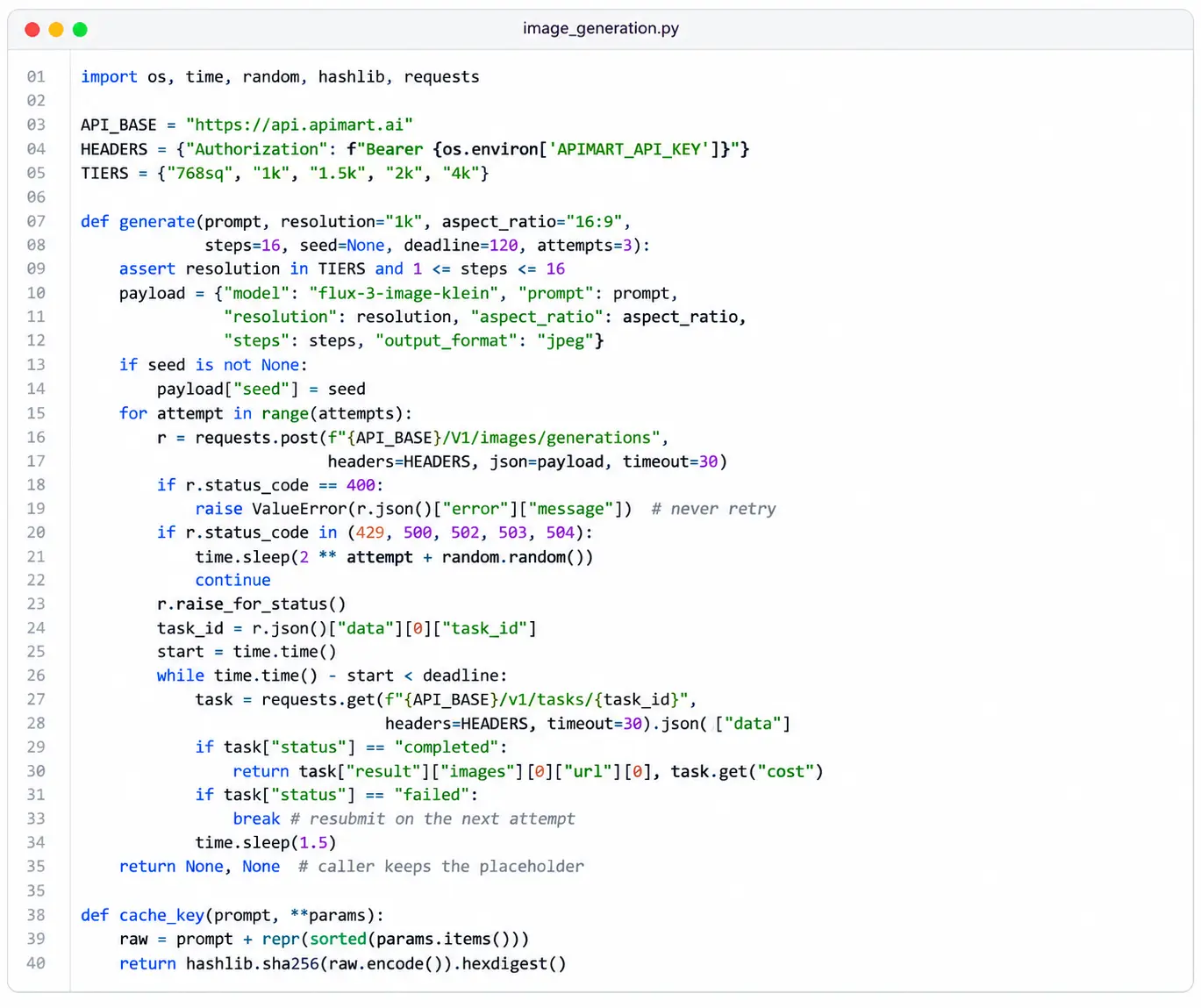
A few rules we added around it:
- Cache by a hash of prompt plus parameters and store the downloaded file in your own bucket immediately. Result URLs expire after 72 hours.
- Always render a deterministic fallback first (initials avatar, gradient cover) and swap it when the job finishes. A failed or slow job should never block the page.
- Run jobs from a queue with a worker pool; we cap each user at 10 parallel jobs.
- Do not offer 4k on demand. At 86 seconds it belongs in a batch job.
- Label generated avatars and covers as AI-made in your terms and alt text.
What it costs
At list price, 1,000 images at 1k cost $9, or $8 at 768sq, which is plenty for avatars. With our discount it came to $7.20. Our whole test, 113 images including one 4k and two 2k, cost $0.84. For a small app, the cost is a rounding error next to hosting; the ten-second wait is the thing to design around.
- ✔ Be Respectful
- ✔ Stay Relevant
- ✔ Stay Positive
- ✔ True Feedback
- ✔ Encourage Discussion
- ❌ Avoid Spamming
- ❌ No Fake News
- ❌ Don't Copy-Paste
- ❌ No Personal Attacks