
Top 7 Domain Providers – Who’s Worth Your Money?
Not sure which is the best domain registrar in 2026? I totally get that.
I’ve bought and managed hundreds of domains, and trust me, not all registrars are worth it. Some look cheap at first but charge more later. Others have poor support. In this post, I’ll share my top picks for the best domain registrar in 2026 so you can skip the trial and error.
So, guys, what are you waiting for? Keep reading and find your best match.
Best Domain Registrar in 2026
As I promised earlier, here are the 6 best domain registrars in 2026. These are not random picks. I’ve used them and had excellent results. That’s why I feel confident recommending them to you today.
- Dreamhost
- Atom
- Spaceship
- Namecheap
- Porkbun
- Cloudflare Registrar
- Hostinger
Here are seven domain registrars overview:.
|
Domain Registrar |
Best For |
.com Registration |
.com Renewal |
|
DreamHost |
Best Overall |
$10.99 |
$21.99 |
|
Atom |
Domain Names and Branding |
$9.97 |
$11.65 |
|
Spaceship |
Affordable Pricing |
$9.48 |
$10.68 |
|
Namecheap |
Easy Domain Management |
$12.08 |
$19.98 |
|
Porkbun |
Simple Pricing |
$11.81 |
$11.81 |
|
Cloudflare Registrar |
Developers |
Around $11.17 |
Around $11.17 |
|
Hostinger |
Beginners |
Rs.499* |
Rs.4,399 |
Prices are approximate and can change. Spaceship's listed prices have an additional $0.20 ICANN fee. Hostinger's Rs.499 introductory .com price requires a three-year term. Always check the final checkout price.
Let us now look at each domain registrar in detail.
1. DreamHost: Best Overall Domain Registrar
DreamHost is a good choice for people who want to buy a domain and build a website in one place. It offers domain registration, web hosting, WordPress hosting, and free domain privacy for supported extensions.
I recommend DreamHost to beginners, bloggers, and small business owners who prefer to manage their website services through one account. Its main drawback is the higher .com renewal price.
Price and Buying Options
DreamHost offers different prices for domain registration, renewal, and transfer. You can also get a free first-year domain with eligible annual hosting plans.
- Product: DreamHost .com Domain Registration
- New Registration: $10.99 for one year.
- Renewal: $21.99 per year.
- Transfer: $10.99.
- Domain Privacy: Free for supported extensions.
- Free Domain Offer: Eligible annual hosting plans include a free domain for the first year.
- Payment Term: One year for the listed registration price.
Prices are based on DreamHost's official domain pricing page. Hosting and domain registration are separate unless your selected hosting offer includes a domain.
Main Features and Specifications
DreamHost provides the main tools you need to register and manage a domain. It also offers hosting and website services, making it useful for people who want to build a website after purchasing their domain.
1. Domain Registration and Management
DreamHost supports many domain extensions and provides basic management tools. You can register a new domain or transfer an existing one.
- 400+ Domain Extensions: Choose from popular options such as .com, .net, .org, and many other extensions.
- DNS Management: Manage your domain records and connect your domain to hosting or other services.
- Domain Transfers: Move an eligible domain from another registrar to DreamHost.
- Domain Renewal: Renew your domain through your DreamHost account.
- Custom Domain Settings: Manage important domain settings through its control panel.
2. Privacy and Security
DreamHost provides privacy and security features to help protect your domain and website. Some features depend on the domain extension and hosting service you select.
- Free WHOIS Privacy: Hide your personal contact details from public domain records for supported extensions.
- SSL Certificates: Get SSL certificates through eligible hosting services to help protect website connections.
- DNS Management: Control the records that connect your domain to your website and email.
- Domain Protection: Manage your domain settings and account access through the control panel.
3. Hosting and Website Setup
One useful benefit of DreamHost is that you can purchase a domain and hosting from the same company. This makes website setup easier for beginners.
- WordPress Hosting: Choose a hosting plan for your WordPress website.
- Shared Hosting: Start with a hosting plan for a small website or blog.
- Free First-Year Domain: Get a free domain with eligible annual hosting plans.
- Email Services: Create a professional email address using your domain through available email services.
- Website Management: Manage your domain and hosting through one account.
4. Customer Support and Refund Policy
DreamHost provides help through its support channels. However, domain registration and hosting have different refund conditions.
- Customer Support: Contact DreamHost through its available online support options.
- Phone Support: Some phone support options may require an additional payment.
- Domain Cancellation: Domain registrations have limited cancellation rights. Check the terms before purchasing.
- Hosting Refund: Eligible shared hosting plans include a 97-day money-back guarantee.
- Separate Domain Rules: The hosting refund does not mean every domain purchase is refundable.
Pros of DreamHost
DreamHost offers several benefits, especially for people who want to manage their domain and hosting together.
- Free domain privacy for supported extensions.
- Free first-year domain with eligible annual hosting plans.
- More than 400 domain extensions.
- Easy WordPress hosting setup.
- Domain and hosting management through one account.
- Different hosting options for website owners.
Cons of DreamHost
Although DreamHost offers useful services, there are a few drawbacks to consider before purchasing.
- The .com renewal price is higher than several budget registrars.
- Domain privacy is not available for every extension.
- Professional email may require a separate payment.
- Some phone support options cost extra.
- It may not be the best choice for people managing large domain portfolios.
Who Should Buy DreamHost?
DreamHost is a good choice for people who want more than basic domain registration. Its domain and hosting services can be useful for the following users.
- New Website Owners: People who want to buy a domain and hosting from one company.
- WordPress Beginners: Users who need an easy way to connect a domain with WordPress.
- Small Business Owners: Businesses that want to build a website and manage hosting in one place.
- Bloggers: People who want a domain and hosting for a new blog.
- Non-Technical Users: Beginners who prefer a simple control panel instead of managing different services.
Who Should Skip DreamHost?
DreamHost may not be the best choice for everyone. You should compare other registrars if you have different requirements.
- Budget Buyers: People who only need a domain at the lowest possible renewal price.
- Domain Investors: Users who manage dozens or hundreds of domains.
- Bulk Domain Buyers: People who need advanced tools for managing large domain portfolios.
- Low-Cost Domain Seekers: Buyers who want to reduce their long-term .com renewal costs.
Our Verdict
DreamHost is a practical choice for people who want domain registration and hosting together. I would recommend it to beginners and small business owners who value convenience. However, if you only need a domain, compare its renewal price with Spaceship and Porkbun before purchasing.
2. Atom: Best for Domain Names and Branding
Atom is more than a regular domain registrar. It also provides a marketplace where you can find premium domain names for businesses, websites, and new brands.
You can register a standard domain, search for brandable names, or purchase an existing premium domain. I recommend Atom to startups, business owners, and people who want a memorable domain name. Its main drawback is that premium domain names can cost much more than regular registrations.
Price and Buying Options
Atom offers standard domain registration as well as premium domain names through its marketplace. Make sure you understand the difference before purchasing because premium domains have separate prices.
- Product: Atom Standard .com Domain Registration.
- New Registration: $9.97 for the first year at the listed promotional price.
- Regular Registration Price: $11.65.
- Renewal: $11.65 per year.
- Transfer: $11.65.
- Domain Privacy: Free WHOIS privacy for eligible domains.
- Payment Term: One year for the listed standard registration price.
- Premium Domains: Prices depend on the domain name and its seller.
The listed standard registration promotion is different from the renewal price. Check the official pricing page before completing your order.
Main Features and Specifications
Atom combines domain registration with tools for finding, buying, and managing brandable domain names. These features make it useful for people who are building a new business or searching for a memorable online name.
1. Domain Registration and Management
Atom allows you to register new domains and manage existing ones through its dashboard. You can also search for several domain names at once.
- Domain Registration: Register popular extensions such as .com, .net, .org, and other supported options.
- Bulk Domain Search: Check many domain name ideas in one search.
- Domain Transfers: Move eligible domains from another registrar to Atom.
- DNS Management: Manage domain records and connect your domain to hosting services.
- Domain Forwarding: Redirect visitors from your domain to another website.
- Domain Renewal: Manage renewals and auto-renewal settings from your account.
2. Premium Domain Marketplace
One of Atom's main features is its premium domain marketplace. It gives buyers access to domain names that are already owned and listed for sale.
- Premium Domain Names: Browse existing domains listed by their owners.
- Brandable Domains: Find names that may suit a new business, product, or startup.
- One-Word Domains: Explore short and memorable domain names.
- Installment Options: Some premium domains offer payment plans.
- Domain Purchase Protection: Atom provides purchase protection for eligible marketplace transactions.
Remember that premium domain prices can be much higher than regular domain registration fees.
3. AI Naming and Branding Tools
Atom also offers tools that can help you find a suitable name for your business. These features are useful when you have a business idea but have not selected a domain yet.
- AI Domain Name Generator: Enter keywords or a business idea to receive domain name suggestions.
- Brand Name Ideas: Explore names that may fit your business or project.
- Domain Appraisal: Use available appraisal tools to help understand a domain's estimated value.
- Brand Monitoring: Atom includes a limited period of brand monitoring with eligible services.
- Trademark Checks: Use available tools to review potential naming conflicts before choosing a brand name.
4. Customer Support and Extra Services
Atom provides domain management tools and support for both regular registrations and marketplace purchases.
- Customer Assistance: Contact Atom through its available support channels.
- Domain API: Developers and domain managers can use its API for supported tasks.
- Bulk Management: Manage multiple domains through one account.
- Domain Privacy: Free WHOIS privacy is included for eligible extensions.
- DNS and Forwarding: Manage DNS records and domain forwarding without purchasing a separate service.
Pros of Atom
Atom offers several useful benefits for people who want to register or purchase a brandable domain.
- Affordable promotional price for standard .com registration.
- Free WHOIS privacy for eligible domains.
- Premium domain marketplace.
- AI domain name generator.
- Bulk domain search and management.
- Domain appraisal tools.
- DNS management and domain forwarding.
- Domain API for supported tasks.
Cons of Atom
Atom also has a few limitations that buyers should understand before choosing it.
- Premium domain names can be expensive.
- Promotional registration prices are different from renewal prices.
- Its marketplace may be unnecessary for people who only need a basic domain.
- Buyers need to check whether a domain is standard or premium.
- Some marketplace purchases may have different payment conditions.
Who Should Buy Atom?
Atom is a useful option for people who care about branding and want to find a memorable domain name.
- Startups: People searching for a suitable name for a new company.
- Business Owners: Companies that want a memorable domain for their brand.
- Domain Investors: People who buy and sell domain names.
- Brand Builders: Users who want access to premium domains and naming tools.
- Entrepreneurs: People who need help finding a domain for a new business idea.
Who Should Skip Atom?
Atom may not be the right choice if you only need a low-cost domain and do not need its marketplace or branding features.
- Basic Website Owners: People who only want to register a simple .com domain.
- Very Tight Budgets: Buyers who cannot afford premium domain prices.
- Hosting Buyers: Users who want domain registration and a complete hosting package from one company.
- Simple Domain Users: People who do not need domain appraisal, branding, or marketplace tools.
Our Verdict
Atom is worth considering if finding the right brand name is as important as registering the domain. Its standard domain registration prices are competitive, and its marketplace offers more choices for businesses that want a memorable name. However, compare standard and premium domain prices carefully before buying.
3. Spaceship: Best for Affordable Domain Pricing
Spaceship is a domain registrar that focuses on affordable registration prices and simple domain management. It offers domain registration, free privacy protection, DNS management, hosting, and email services.
I recommend it to bloggers, freelancers, and small business owners who want to keep their domain costs low. Its renewal prices are also competitive, making it worth considering for long-term domain ownership.
Price and Buying Options
Spaceship offers different prices for registration, renewal, and transfer. Its .com introductory price is lower than its renewal price, so check both before purchasing.
- Product: Spaceship Standard .com Domain Registration.
- New Registration: $9.48 for one year.
- Renewal: $10.68 per year.
- Transfer: $10.18.
- ICANN Fee: Additional $0.20 per year.
- Domain Privacy: Free for eligible domains.
- Payment Term: One to several years, depending on the selected option.
The final price includes the applicable ICANN fee at checkout. Check the official pricing page because offers can change.
Main Features and Specifications
Spaceship offers more than basic domain registration. It provides several tools for managing your domain and connecting it to websites, email, and other online services.
1. Domain Registration and Management
Spaceship supports many popular domain extensions and gives users tools to manage their domains from one account.
- Domain Extensions: Register popular extensions such as .com, .net, .org, and other options.
- Domain Search: Search for available domain names before purchasing.
- DNS Management: Manage DNS records and connect your domain to hosting providers.
- Domain Transfers: Move eligible domains from another registrar to Spaceship.
- Auto-Renewal: Enable automatic renewal to reduce the risk of losing your domain.
- Domain Management: Manage your domain settings through the Spaceship dashboard.
2. Privacy and Security
Spaceship provides privacy and security features that help protect your domain information and manage access.
- Free Domain Privacy: Hide your personal contact details from public domain records for supported extensions.
- Domain Lock: Help protect your domain against unauthorized transfers.
- DNSSEC: Use DNS security features where supported.
- Account Security: Manage account access and available security settings.
- Domain Protection: Use available domain protection options to reduce the risk of unwanted changes.
3. Hosting and Email Services
You can also use Spaceship for services beyond domain registration. These options are useful if you want to build a website or create a professional email address.
- Web Hosting: Purchase hosting for your website.
- Email Hosting: Create professional email addresses using your domain.
- Website Connections: Connect your domain to WordPress, Shopify, and other platforms.
- DNS Settings: Point your domain to the hosting or email provider you choose.
- Website Management: Manage supported services from your Spaceship account.
4. Customer Support and Refund Policy
Spaceship provides support and account management options for domain owners. However, refund conditions depend on the service and domain extension.
- Customer Support: Contact the support team through its available support channels.
- Help Resources: Find information about domain registration, transfers, and management.
- Domain Cancellation: Cancellation rules depend on the domain extension and applicable registration conditions.
- Refund Policy: Check the refund terms for your selected domain or service before purchasing.
Pros of Spaceship
Spaceship offers several benefits for people who want affordable domain registration and useful management tools.
- Competitive .com registration price.
- Low listed .com renewal price.
- Free privacy protection for eligible domains.
- Domain transfer service.
- DNS management tools.
- Hosting and email services are available.
- Auto-renewal options.
- Simple domain management dashboard.
Cons of Spaceship
There are a few things you should consider before choosing Spaceship.
- The first-year price is lower than the renewal price.
- The ICANN fee is added separately for .com domains.
- Some extensions have much higher renewal costs.
- Premium domains may cost more than standard registrations.
- Hosting and email services may require separate payments.
- Some advanced features may take time for beginners to understand.
Who Should Buy Spaceship?
Spaceship is a good option for people who want affordable domain registration and basic management features.
- Bloggers: People who need a low-cost domain for a new blog.
- Freelancers: Users who want a domain for their portfolio or personal website.
- Small Business Owners: Businesses that need an affordable online address.
- Budget Buyers: People who want to reduce their registration and renewal costs.
- Website Managers: Users who want to manage multiple domains from one account.
Who Should Skip Spaceship?
Spaceship may not be the best choice for everyone. Consider another registrar if you need more specialized services.
- Advanced Domain Investors: People who need specialized marketplace or auction tools.
- Hosting Buyers: Users who want a complete managed hosting package.
- Premium Support Seekers: People who need a specific type of support service.
- Large Agencies: Businesses that need advanced client and reseller management features.
Our Verdict
Spaceship is a strong option for buyers who want affordable domain registration without paying high renewal prices. I would recommend it to bloggers, freelancers, and small business owners who want to keep their domain costs under control. Check the final price, including the ICANN fee, before completing your purchase.

4. Namecheap: Best for Easy Domain Management
Namecheap is a popular domain registrar that offers domain registration, privacy protection, DNS management, hosting, and email services. You can register a domain without purchasing hosting from the same company.
I recommend Namecheap to bloggers, freelancers, and small business owners who want to manage their domains separately from hosting. Its main benefit is the range of domain management tools, although its renewal price is higher than its first-year promotional price.
Price and Buying Options
Namecheap offers promotional prices for new domain registrations. Its renewal price is different, so check the regular cost before placing your order.
- Product: Namecheap Standard .com Domain Registration.
- New Registration: $12.08 at the listed sale price.
- Regular Registration Price: $15.98.
- Renewal: $19.98 per year.
- Transfer: $12.28 at the listed sale price.
- Domain Privacy: Free for eligible domains.
- Payment Term: One year for the listed price.
Prices are based on Namecheap's official .com pricing page. Check whether any additional fee applies at checkout.
Main Features and Specifications
Namecheap focuses on domain registration and management. It also offers extra services that you can purchase when you need hosting, email, or additional DNS protection.
1. Domain Registration and Management
Namecheap provides tools for searching, registering, transferring, and managing domain names.
- Domain Extensions: Choose from popular options such as .com, .net, .org, and many others.
- Domain Search: Search for available domain names before registering them.
- Bulk Domain Search: Check several domain name ideas at once.
- Domain Transfers: Move eligible domains from another registrar.
- Domain Forwarding: Send visitors from one domain to another website.
- DNS Management: Add and edit DNS records to connect your domain with websites and email services.
2. Privacy and Security
Namecheap offers privacy and security features to help protect your personal information and domain settings.
- Free Domain Privacy: Hide your personal contact details from public domain records for eligible domains.
- DNSSEC: Add an extra layer of protection to eligible DNS records.
- PremiumDNS: Purchase an optional service for additional DNS features.
- Domain Lock: Help prevent unauthorized domain transfers.
- Account Security: Use available account security settings to protect access.
3. Hosting and Email Services
You do not have to purchase hosting from Namecheap when registering a domain. However, you can buy its other services if you want to manage more things from one account.
- Shared Hosting: Purchase hosting for a personal or business website.
- WordPress Hosting: Choose a hosting service for a WordPress website.
- Business Email: Create professional email addresses using your domain.
- Third-Party Connections: Connect your domain to services such as Google Workspace and other hosting providers.
- Website Connections: Use DNS settings to point your domain to your preferred website platform.
4. Customer Support and Refund Policy
Namecheap provides support for domain management and other services. Its refund conditions depend on the product you purchase.
- Live Chat: Contact support through its online chat service.
- Ticket Support: Submit a support request when you need assistance.
- Phone Support: Namecheap does not offer regular phone support.
- Domain Cancellation: New domain registrations have limited cancellation rules. Check the terms for your extension.
- Hosting Refund: Eligible hosting plans include a 30-day money-back guarantee. This does not apply to every domain or add-on.
Pros of Namecheap
Namecheap offers several useful benefits for buyers who want a separate domain registrar with easy management tools.
- Free privacy protection for eligible domains.
- Easy domain search and registration.
- Bulk domain search for checking several names.
- DNS management and domain forwarding tools.
- Domain transfer service.
- Hosting and email services are available separately.
- Online customer support.
Cons of Namecheap
Namecheap also has a few drawbacks that buyers should understand before choosing it.
- The renewal price is higher than the first-year sale price.
- PremiumDNS costs extra.
- Regular phone support is not available.
- Some advanced DNS settings require manual setup.
- Extra services may increase the total cost.
Who Should Buy Namecheap?
Namecheap is a good option for people who want to register and manage a domain without being required to purchase hosting.
- Bloggers: People who want to register a domain for a personal or business blog.
- Freelancers: Users who need a domain for their portfolio or personal website.
- Small Business Owners: Businesses that want to manage their domain separately from hosting.
- Website Managers: People who need tools to manage multiple domains.
- Independent Website Owners: Users who prefer choosing their own hosting provider.
Who Should Skip Namecheap?
Namecheap may not suit you if you have specific support or pricing requirements.
- Phone Support Seekers: People who prefer speaking with support over the phone.
- Low-Cost Buyers: Users who want the lowest possible long-term renewal price.
- Advanced DNS Users: People who want advanced DNS services included without extra payment.
- Hosting Beginners: Users who want domain registration and hosting in one simple package.
Our Verdict
Namecheap is a useful option for people who want easy domain management and free privacy protection for eligible domains. It is suitable for bloggers, freelancers, and small businesses. However, compare its renewal price with Spaceship and Porkbun before making your final decision.
5. Porkbun: Best for Simple and Clear Pricing
Porkbun is a domain registrar known for its simple pricing and useful free features. It offers domain registration, free privacy protection, SSL certificates, email forwarding, and DNS management.
I recommend it to bloggers, developers, and small business owners who want predictable domain costs. Its main attraction is that the listed .com registration and renewal prices are the same.
Price and Buying Options
Porkbun lists its registration, renewal, and transfer prices clearly. This makes it easier to understand the long-term cost of keeping a domain.
- Product: Porkbun Standard .com Domain Registration.
- New Registration: $11.81 per year.
- Renewal: $11.81 per year.
- Transfer: $11.81.
- Domain Privacy: Free.
- SSL Certificates: Free for supported domains.
- Payment Term: One year for the listed price.
- Extra Fees: ICANN and other applicable fees are included in the listed prices.
These prices apply to standard, non-premium .com domains.
Main Features and Specifications
Porkbun offers more than basic domain registration. It also provides free tools that help you manage your domain and connect it to your website.
1. Domain Registration and Management
Porkbun supports popular domain extensions and provides tools for managing your domain settings.
- Domain Extensions: Register popular options such as .com, .net, .org, and many other extensions.
- DNS Management: Manage your domain records and connect your domain to different hosting providers.
- Domain Transfers: Move eligible domains from another registrar to Porkbun.
- Domain Marketplace: Explore domain names listed for sale by other owners.
- Domain Renewal: Renew your domains through your account.
- URL Forwarding: Send visitors from your domain to another website or web address.
2. Free Privacy and Security Features
Porkbun includes several useful features with its domain registrations. These tools can help protect your contact information and website connections.
- Free WHOIS Privacy: Hide your personal contact information from public domain records where supported.
- Free SSL Certificates: Get Let's Encrypt SSL certificates for supported domains.
- Email Forwarding: Forward messages sent to your domain to another email address.
- Cloudflare DNS: Use DNS management powered by Cloudflare.
- Domain Protection: Manage your domain settings and available security options.
3. Ease of Use and Compatibility
Porkbun allows you to connect your domain to different website platforms and services. This is useful if you already have hosting somewhere else.
- Simple Checkout: Register a domain through its online checkout process.
- Hosting Compatibility: Connect your domain to WordPress, Shopify, and other hosting platforms.
- Developer Tools: Use API access and DNS controls for supported domain management tasks.
- Email Services: Use email forwarding or purchase a separate email hosting service.
- Domain Management: Manage your domains through one account.
4. Customer Support and Refund Policy
Porkbun provides support for domain owners, but refund conditions depend on the product and domain extension.
- Customer Support: Contact Porkbun through its available email, chat, and phone support options.
- Help Resources: Find guides about domain registration, transfers, and DNS settings.
- Domain Refunds: Domain registrations have limited cancellation rules. Check the terms for your extension.
- Hosting Services: Hosting and email products may have separate payment and refund terms.
Pros of Porkbun
Porkbun offers several useful benefits for people who want affordable domain management.
- Same listed .com registration and renewal price.
- Free WHOIS privacy for supported domains.
- Free SSL certificates for supported domains.
- Free email and URL forwarding.
- Clear pricing with included ICANN fees.
- Useful DNS management tools.
- Domain transfer service.
- API access for supported tasks.
Cons of Porkbun
Porkbun also has a few drawbacks to consider before choosing it.
- It does not offer as many hosting services as some competitors.
- Some email and hosting services require separate payments.
- Its playful website design may not appeal to every business owner.
- Some features may take time to understand if you are new to domain management.
- Phone support is not available around the clock.
Who Should Buy Porkbun?
Porkbun is a good option for people who want clear pricing and useful domain features without paying for several extras.
- Bloggers: People who want an affordable domain for a new blog.
- Small Business Owners: Businesses that need free privacy and basic domain tools.
- Developers: Users who need DNS controls and API access.
- Long-Term Domain Owners: People who want to avoid large renewal price increases.
- Budget Buyers: Users who want useful free features with their domain.
Who Should Skip Porkbun?
Porkbun may not be the right choice if you need a wider range of services from one company.
- Hosting Buyers: People who want advanced hosting and website-building services in one place.
- Phone Support Seekers: Users who need 24/7 phone support.
- Corporate Users: Businesses that prefer a traditional corporate-style dashboard.
- All-in-One Service Buyers: People who want domain, hosting, email, and website management in one package.
Our Verdict
Porkbun is a strong option for buyers who care about long-term domain costs. Its equal listed registration and renewal price makes it easier to plan your expenses. I would recommend it to bloggers, developers, and small business owners who want affordable domain management.

6. Cloudflare Registrar: Best for Developers
Cloudflare Registrar is a good option for developers and experienced website owners who understand domain settings. It offers domain registration at the price charged by the domain registry, without adding its own registrar markup.
You also get useful features such as DNSSEC, WHOIS data redaction, and access to Cloudflare's DNS and security services. However, beginners may find its setup less convenient because domains registered through Cloudflare must use Cloudflare nameservers.
Price and Buying Options
Cloudflare Registrar uses at-cost pricing. This means you pay the registry and ICANN fees without an additional registrar markup.
- Product: Cloudflare .com Domain Registration.
- New Registration: Around $11.17 per year.
- Renewal: Around $11.17 per year.
- Transfer: Charged at the applicable registry and ICANN cost.
- Domain Privacy: Free WHOIS data redaction where supported.
- DNSSEC: Free.
- Payment Term: Depends on the domain extension and registration period.
The .com amount reflects the registry and ICANN costs after the November 2026 registry price change. The final amount can change if registry fees change.
Main Features and Specifications
Cloudflare provides domain registration along with DNS and security tools. Its services are especially useful for people who already use Cloudflare for their websites.
1. Domain Registration and Pricing
Cloudflare offers domain registration and renewal without adding its own markup. However, it supports a selected range of domain extensions.
- At-Cost Pricing: Pay the registry and ICANN price without an extra registrar markup.
- Domain Transfers: Move eligible domains from another registrar to Cloudflare.
- Registration and Renewal: Pay the applicable registry price when registering or renewing.
- Domain Extensions: Choose from the extensions supported by Cloudflare Registrar.
- Auto-Renewal: Manage automatic renewal through your Cloudflare account.
2. Security and DNS Features
Cloudflare provides security tools that help protect domain information and DNS records.
- Free WHOIS Redaction: Hide most personal contact details from public domain records where registry rules allow it.
- DNSSEC: Enable DNSSEC to add protection against certain types of fake DNS information.
- Cloudflare DNS: Manage DNS records through the Cloudflare dashboard.
- Website Security: Connect your domain with Cloudflare's website security services.
- DNS Protection: Use Cloudflare's DNS tools to manage how visitors reach your website.
3. Ease of Use and Compatibility
Cloudflare's dashboard allows users to manage domains, DNS settings, and other services from one account. However, its setup may require some technical knowledge.
- Cloudflare Dashboard: Manage domains and DNS settings from one account.
- Website Connections: Connect your domain with services that work with Cloudflare DNS.
- Developer Tools: Use Cloudflare services for website development and security.
- Nameserver Requirement: Domains registered with Cloudflare Registrar must use Cloudflare nameservers.
- Third-Party Hosting: You can connect your domain to another hosting provider, but the domain must continue using Cloudflare nameservers.
4. Customer Support and Refund Policy
Cloudflare provides different support options depending on the account plan. Its domain refund rules are also important to understand.
- Free Account Support: Free users can use the available help resources and community support.
- Paid Support: Some paid plans provide additional support options.
- Domain Refunds: Completed domain registrations and renewals are non-refundable.
- Transfer Costs: Domain transfers are charged according to the applicable registry and ICANN costs.
- Account Management: Manage renewal and domain settings through the dashboard.
Pros of Cloudflare Registrar
Cloudflare offers several benefits for people who understand DNS and want affordable domain management.
- No extra registrar markup on domain prices.
- At-cost registration and renewal.
- Free DNSSEC.
- Free WHOIS data redaction where supported.
- Access to Cloudflare DNS and security services.
- Useful tools for developers and technical users.
- Automatic renewal options.
Cons of Cloudflare Registrar
Cloudflare also has some important limitations that buyers should understand.
- You must use Cloudflare nameservers.
- Beginners may find the dashboard difficult.
- Completed domain purchases are non-refundable.
- Support options depend on your account plan.
- It does not provide traditional web hosting with domain registration.
- It supports fewer extensions than some large registrars.
Who Should Buy Cloudflare Registrar?
Cloudflare Registrar is best for people who already understand DNS and want affordable domain management.
- Developers: People who manage websites, applications, and online projects.
- Security Professionals: Users who need DNSSEC and Cloudflare security tools.
- Experienced Website Owners: People who already use Cloudflare for their websites.
- Technical Users: Buyers who understand nameservers and DNS settings.
- Long-Term Domain Owners: People who want to avoid extra registrar markups.
Who Should Skip Cloudflare Registrar?
Cloudflare may not suit you if you need a simple setup or want more flexibility.
- First-Time Buyers: People who need step-by-step help with domain settings.
- Non-Technical Users: Beginners who do not understand DNS or nameservers.
- Other DNS Provider Users: People who want to use another company's nameservers.
- Phone Support Seekers: Users who prefer regular phone support.
- Refund Seekers: Buyers who want the option to cancel a domain purchase and receive a refund.
Our Verdict
Cloudflare Registrar is a good choice for developers and experienced website owners who already use Cloudflare. Its at-cost pricing and security tools are attractive. However, the nameserver requirement makes it less flexible than other registrars, so beginners may prefer Spaceship, Porkbun, or Namecheap.
7. Hostinger: Best for Beginners
Hostinger is a useful option for beginners who want to register a domain and build a website without using different companies. It offers domain registration, web hosting, WordPress tools, professional email, and an AI website builder.
I recommend it to new bloggers, freelancers, and small business owners who want an easy starting point. However, pay close attention to the payment term and renewal price before choosing a plan.
Price and Buying Options
Hostinger offers a promotional .com registration price in Pakistan. The offer requires a three-year term, and the regular renewal price is much higher.
- Product: Hostinger .com Domain Registration.
- New Registration: Rs.499 for the first year.
- Required Term: Three years for the advertised introductory offer.
- Renewal: Rs.4,399 per year.
- Free Domain: Eligible hosting plans include a free domain for the first year.
- Hosting Option: Premium Web Hosting is advertised at Rs.599 per month on a 48-month term.
- Upfront Hosting Payment: Rs.28,752 for the 48-month Premium plan.
- Hosting Renewal: Rs.1,699 per month for the same 48-month term.
The Rs.499 domain offer and the hosting offer are separate pricing options. The monthly hosting price is not a monthly payment option; the full term is paid upfront.
Main Features and Specifications
Hostinger combines domain registration with hosting and website-building services. Its tools are designed to help beginners start a website without learning many technical settings.
1. Domain Registration and Management
Hostinger allows users to search for and register domains directly through its website. You can also manage your domain settings through its dashboard.
- Domain Search: Search for available domain names before purchasing.
- Domain Extensions: Choose from popular options such as .com, .net, .org, and other supported extensions.
- Free First-Year Domain: Eligible hosting plans include one year of domain registration.
- DNS Management: Manage your domain records through your Hostinger account.
- Domain Privacy: Privacy protection is available for eligible domain extensions.
- Auto-Renewal: Enable automatic renewal to help prevent your domain from expiring.
2. Website Building and Hosting
Hostinger offers several website tools that can help beginners create and manage a website.
- AI Website Builder: Create a website with the help of AI tools without writing code.
- WordPress Hosting: Install WordPress and manage your website through the dashboard.
- Website Storage: The Premium hosting plan includes 20 GB of storage.
- Free SSL: Protect website connections with included SSL certificates.
- CDN: Use the included content delivery network to help serve website content to visitors.
- Website Limit: The Premium hosting plan supports up to three websites.
3. Ease of Use and Compatibility
Hostinger provides a central dashboard for managing hosting, domains, email, and website settings.
- hPanel: Manage hosting, domains, and website settings through one dashboard.
- WordPress Support: Set up and manage WordPress websites.
- Email Setup: Create professional email addresses using your domain through eligible plans.
- AI Tools: Use website-building tools to make the setup process easier.
- Website Management: Manage supported website services from one account.
4. Customer Support and Refund Policy
Hostinger offers customer support and refund options for eligible products. However, domain and hosting refund rules are different.
- 24/7 Support: Contact Hostinger through its available online support channels.
- 30-Day Hosting Refund: Eligible hosting plans come with a 30-day money-back guarantee.
- Domain Refund: Some general domain registrations, such as .com, may qualify for a refund within 96 hours, subject to the applicable terms.
- Free Domain Conditions: If you receive a free domain with hosting and later request a hosting refund, Hostinger may deduct the domain's regular price.
- Separate Refund Rules: Always check the terms for the selected product and domain extension.
Pros of Hostinger
Hostinger offers several benefits for people starting their first website.
- Affordable introductory .com registration offer.
- Free first-year domain with eligible hosting plans.
- Beginner-friendly hPanel dashboard.
- AI website builder for easier website creation.
- WordPress hosting and setup tools.
- Free SSL certificates.
- Hosting and domain services in one account.
- 24/7 customer support.
Cons of Hostinger
Hostinger also has a few drawbacks that you should understand before purchasing.
- The Rs.499 domain offer requires a three-year term.
- The full hosting payment is required upfront for long-term plans.
- The renewal price is much higher than the introductory price.
- The free domain only covers the first year.
- Domain privacy depends on the extension.
- Standalone domain registration may not offer the best long-term value.
Who Should Buy Hostinger?
Hostinger is a useful choice for beginners who want to build a website and need hosting along with a domain.
- New Bloggers: People who want to start a blog with WordPress.
- Small Business Owners: Businesses that need a website and hosting in one place.
- Freelancers: People who want to create a portfolio website.
- Non-Technical Users: Beginners who want to use an AI website builder instead of coding.
- New Website Owners: People who prefer one account for domains, hosting, and email.
Who Should Skip Hostinger?
Hostinger may not be the best choice if you only need domain registration or do not want a long-term hosting commitment.
- Domain-Only Buyers: People who do not need web hosting.
- Short-Term Users: Buyers who do not want to pay for a multi-year plan.
- Budget-Conscious Users: People who want to avoid higher renewal prices.
- Existing Website Owners: Users who already have hosting with another company.
- Domain Investors: People who need advanced bulk domain management tools.
Our Verdict
Hostinger is a good starting point if you want to build a website and need hosting with your domain. Its beginner-friendly tools make website setup easier. However, do not choose it only because of the low introductory price. Compare the full upfront payment and renewal cost before purchasing.
How We Reviewed These Domain Registrars
I focused on the details that can affect your domain budget after you buy. A cheap first-year price is not enough to make a registrar a good choice. You should also understand renewal fees, privacy costs, account tools, and the rules for moving your domain.
Here is what I considered when preparing this guide:
- Registration prices: I checked published prices for standard .com domains where the official sources provided them.
- Renewal costs: I gave special attention to renewal prices because you may keep a domain for many years.
- Extra charges: I looked for privacy fees, ICANN fees, redemption charges, and conditions attached to promotional prices.
- Privacy protection: I checked whether each provider includes privacy protection or charges for it.
- Domain management: I considered DNS tools, transfers, domain search, and portfolio management features.
- Beginner setup: I reviewed whether the provider connects domain registration with hosting or website-building tools.
- Refund rules: I checked the available domain refund information and avoided treating hosting refund periods as domain refund periods.
- Special restrictions: I highlighted important conditions, such as Cloudflare's nameserver requirement.
- Official sources: I used registrar pricing pages, help documents, and policy pages for the details included in the reviews.
- Independent performance: I did not invent DNS speed tests or website performance results. Domain registrar features alone do not prove that a website will load faster.
This is a research-based comparison!
Domain Registrar Selection Checklist
Now that you’ve reviewed the top domain registrars of this year, here’s one more thing to help you choose the right one.
Before you decide, go through this quick checklist. If your chosen registrar covers at least 90% of these features, then you’ve found a solid match.
Use this list to compare and pick the best domain registrar for your needs:
- Domain pricing: Is the initial price low and fair?
- Renewal rates: Are the renewal charges clearly shown and affordable?
- Free WHOIS privacy: Do they give free privacy protection for your domain?
- No hidden fees: Are there any surprise charges during checkout?
- User-friendly dashboard: Is the control panel easy to use and simple to understand?
- Customer support: Can you reach support easily by chat or email when needed?
- Security options: Do they offer two-factor login or account protection?
- Domain transfer process: Is it easy to move your domain in or out?
- Bulk domain management: Can you manage many domains from one place?
- Email forwarding: Do they offer free or paid email forwarding?
- DNS management tools: Is it easy to update DNS settings and records?
- Domain lock feature: Can you lock your domain to prevent theft?
- Reputation and trust: Is the registrar well-known and trusted by others?
- Add-on services: Do they offer extra things like hosting or business email?
- Speed and performance: Does the site work fast without bugs or slow loading?
- Domain search tool: Is it quick and accurate when checking domain name availability?
- Multiple domain extensions: Can you buy different extensions like .com, .net, .org, .info?
- Clear refund policy: Is there a refund option if you change your mind?
- No forced bundling: Can you buy just the domain without being forced into extras?
- Mobile-friendly platform: Can you manage everything easily on your phone too?
Which Registrar Comes Out on Top?
To be honest, I didn’t expect it — but Spaceship really stood out. After going through the checklist and comparing it with the rest, I just liked everything about it. It’s easy on the wallet, simple to use, gives free privacy without any extra charges and also it provides the best domain transfer discount on all major TLDs.
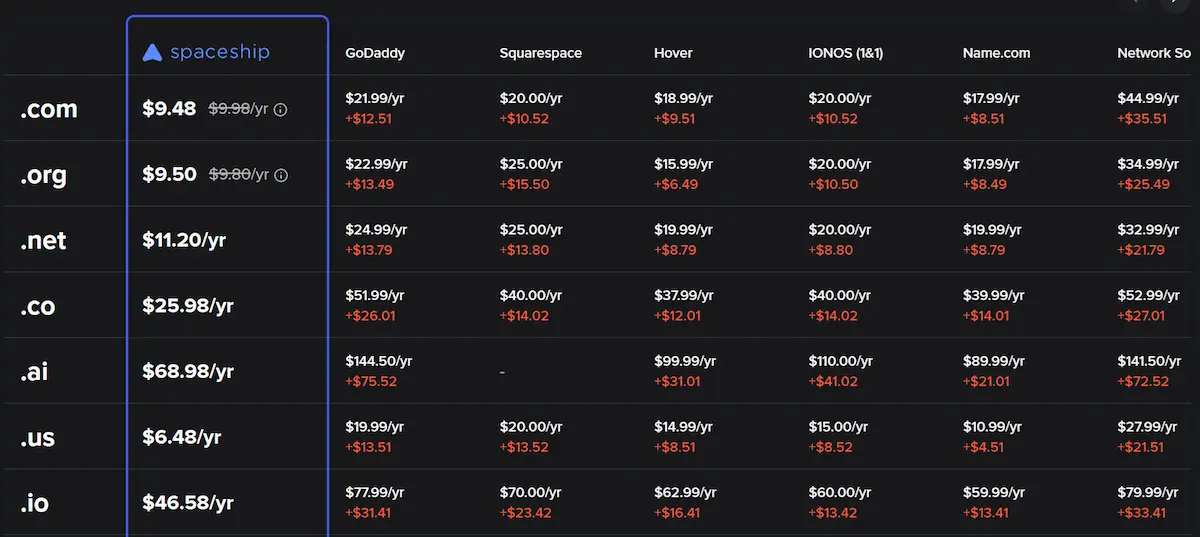
I’ve already moved some of my domains there. I truly think it’s the best domain registrar in 2026, and it’s only going to get better from here.
What to Do After Buying a Domain?
Buying a domain is only the first step. You still need to connect it to your website and protect your account. Take a little time to complete these steps after registration.
- Check ownership details: Make sure the domain is registered under the correct person or business.
- Verify your email: Complete any registration verification request from the registrar.
- Enable two-factor authentication: Add another layer of protection to your account.
- Turn on domain lock: Use the lock feature when you are not transferring the domain.
- Set up DNS records: Connect the domain to your hosting provider or other services.
- Enable auto-renewal carefully: Keep your payment details updated and monitor renewal notices.
- Save account recovery details: Keep your login and recovery information secure.
- Test your website: Open the domain after DNS changes and confirm that it reaches the correct website.
How to Protect Your Domain From Theft or Loss?
Your domain is part of your online identity. Losing access to it can affect your website, email, and business. You should protect both your registrar account and the domain itself.
- Use a strong password: Do not reuse the password from another website.
- Enable two-factor authentication: This can make unauthorized account access harder.
- Keep your email secure: Your email account may be used to reset your registrar password.
- Turn on domain lock: This helps prevent unauthorized transfers.
- Keep contact details updated: Make sure the registrar can reach you.
- Watch renewal reminders: Do not let your domain expire by mistake.
- Avoid sharing account access: Give other people only the access they need.
- Check account activity: Review important changes to DNS, nameservers, and ownership details.
Final Words
In this guide, we covered the 7 best domain registrars for bloggers, freelancers, website owners, and small business owners.
My final advice is to compare more than the first-year price before choosing a domain registrar. Check the renewal cost, domain privacy, DNS tools, transfer rules, and customer support. A low starting price may look attractive, but the renewal price will affect your long-term cost. Choose a registrar that fits your needs and makes managing your domain simple.
Explore our other helpful guides to learn more about domains, hosting, and website building. If you have any questions or need help choosing a registrar, leave a comment below. Good luck with your new website!
FAQs
Here are some of the most commonly asked questions related to top 7 best domain providers:
The best domain registrar depends on your needs and budget. DreamHost is a good overall choice, while Spaceship and Porkbun offer affordable domain registration.
Atom is useful for finding brandable domains, and Cloudflare Registrar is suitable for technical users.
Spaceship and Porkbun are two affordable options for standard .com domains. Both offer competitive registration and renewal prices. However, always compare the final checkout price because fees and promotions can change.
DreamHost is a good option if you want domain registration and hosting from one company. Namecheap is more suitable if you only need a domain and want to choose your hosting provider separately. Compare their renewal prices before making a decision.
Yes, Spaceship is a good option for people who want affordable domain registration and renewal. It offers free privacy protection for eligible domains, DNS management, and domain transfer services. It is especially useful for bloggers, freelancers, and small business owners.
Porkbun is a strong choice if you want simple pricing and useful free features. Namecheap offers a wider range of additional services, including hosting and email. Your choice depends on whether you prefer affordable domain management or more services in one account.
Yes, you can register a domain without purchasing web hosting. You can keep the domain in your account and connect it to a hosting service whenever you are ready to build your website.
All seven registrars in this guide offer domain registration separately from hosting.
Yes, you can transfer an eligible domain from one registrar to another.
You usually need to unlock the domain and get its authorization code before starting the transfer. Some restrictions apply, such as transfer limits after a new registration or previous transfer.
Free WHOIS privacy is a useful feature because it can hide your personal contact details from public domain records. It can help protect your privacy and reduce unwanted contact.
Before purchasing, check whether the registrar offers this feature for your chosen domain extension.
Compare more than the first-year registration price before making your decision. Check these important points:
- Renewal Price: Find out how much you will pay each year after the first term.
- Domain Privacy: Check whether privacy protection is free for your chosen extension.
- Transfer Policy: Make sure you can transfer your domain if you need to.
- DNS Management: Look for easy tools to connect your domain to your website.
- Customer Support: Check the available support options.
- Extra Fees: Review ICANN fees and other charges before checkout.
A domain registrar is a company where you register and manage your website's domain name. Web hosting is a service that stores your website's files and makes them available online.
You need a domain name and hosting to run a traditional website, but you can purchase them from separate companies.
- ✔ Be Respectful
- ✔ Stay Relevant
- ✔ Stay Positive
- ✔ True Feedback
- ✔ Encourage Discussion
- ❌ Avoid Spamming
- ❌ No Fake News
- ❌ Don't Copy-Paste
- ❌ No Personal Attacks