
What Is The Digital Wellbeing App? Complete Guide
Have you ever picked up your phone to check one notification and ended up scrolling for an hour? Or, have you ever wondered how much time you spend on social media, games, and other mobile applications? If yes, you are not alone. Many smartphone users struggle to manage their screen time and control digital distractions.
This is where the "Digital Wellbeing App" becomes useful. It is a helpful Android feature that allows you to monitor your phone usage, manage distractions, and develop healthier digital habits.
So, guys, in this beginner-friendly guide, you will learn what is the digital wellbeing app, how it works, its main features, benefits, limitations, and much more.
I will also share my personal experience to help you understand how this tool can improve your everyday digital habits. So, let's get started!
What Is the Digital Wellbeing App?
The Digital Wellbeing app is an Android feature that helps you track and control how much time you spend on your smartphone. It shows which apps you use most, how often you check your phone, and how many notifications you receive.
It also provides tools like App Timers and Focus Mode to help you reduce distractions and manage your screen time. In simple words, digital well-being helps you understand your phone usage and develop healthier smartphone habits.
Examples of Digital Wellbeing
Digital well-being becomes easier to understand when we look at everyday situations. It is not limited to tracking screen time. It also includes different habits and tools that help people maintain a healthy relationship with technology.
Here are some simple examples of digital well-being:
- A student uses focus mode to avoid social media distractions while studying.
- A remote worker sets an app timer to reduce unnecessary time on entertainment applications.
- A smartphone user checks their screen time dashboard to understand their daily mobile usage.
- A person enables bedtime mode to reduce distractions before sleeping.
- Parents use supported parental controls to manage their children's screen time and app access.
For example, if you spend three hours daily on social media, Digital Wellbeing can help you identify that habit and set limits to manage your usage.
How Does the Digital Wellbeing App Work?
Now that you understand what digital wellbeing is, you might be wondering, how does it actually work? Don't worry. This section will explain its basic working process in a simple and easy-to-follow way.
Digital Wellbeing collects information about your smartphone activity and presents it through an easy-to-understand dashboard. It uses this information to help you identify your digital habits and manage unnecessary distractions.
The basic process includes:
- Activity Tracking: The app monitors your screen time, application usage, phone unlocks, and notification activity.
- Usage Analysis: It organizes your activity data so you can understand which applications consume most of your time.
- Setting Limits: You can create daily timers for applications that you want to use less frequently.
- Managing Distractions: Focus Mode allows you to pause selected distracting applications temporarily.
- Improving Sleep Habits: Bedtime Mode provides settings that can help reduce nighttime phone distractions.
- Monitoring Progress: You can review your usage information regularly and identify changes in your digital habits.
Digital well-being does not automatically change every habit. You need to use its features consistently and make conscious decisions to improve your smartphone usage.
Main Features of the Digital Wellbeing App
Digital well-being includes several features designed to help users manage their smartphone activities. Each feature focuses on a different aspect of digital habits.
Here are its main features:
1. Screen Time Dashboard
The Screen Time Dashboard provides an overview of your daily smartphone usage. It helps you understand how much time you spend on individual applications. It displays information such as:
- Total daily screen time.
- Time spent on individual applications.
- Number of times you unlock your phone.
- Number of notifications received.
- Daily usage patterns.
This feature is particularly helpful when you want to identify applications that consume most of your time.
2. App Timers
App Timers allow you to set daily usage limits for selected applications. When you reach the limit, the application pauses for the rest of the day.
For example, if you spend too much time on Instagram, you can set a daily timer to manage your usage. This feature encourages you to become more responsible with your screen time.
3. Focus Mode
Focus Mode helps you concentrate on important activities by temporarily pausing selected distracting applications. You can use it when:
- Studying for examinations.
- Completing office assignments.
- Attending online meetings.
- Reading books.
- Working on important projects.
It is particularly useful for students and professionals who want to reduce unnecessary mobile distractions.

4. Bedtime Mode
Bedtime Mode helps you prepare for sleep by reducing certain phone-related distractions. Depending on your device and settings, it can:
- Change your screen to grayscale.
- Reduce screen brightness.
- Enable Do Not Disturb.
- Silence selected notifications.
These settings can help you reduce nighttime phone usage and develop a more consistent bedtime routine.
5. Parental Controls
Parental controls help parents manage their children's digital activities and encourage safer smartphone habits. Parents can use supported tools to:
- Manage children's screen time.
- Set application usage limits.
- Approve or restrict app downloads.
- Apply content restrictions.
- Manage certain device settings.
Google Family Link provides additional parental control features and works alongside supported Android devices.
6. Notification Controls
Constant notifications can interrupt your work, studies, and personal activities. Digital Wellbeing and Android notification settings allow you to manage these interruptions by controlling notifications from selected applications.
You can silence unnecessary alerts and keep notifications enabled for applications that are important to you.
Types of Digital Wellbeing Tools
Digital Wellbeing is not limited to one application. Different smartphone manufacturers and technology companies provide tools that help users manage their digital habits.
Here are some common examples:
- Google Digital Wellbeing: Google's digital wellness tools provide screen time tracking, app timers, Focus Mode, and other usage management features on supported Android devices.
- Samsung Digital Wellbeing: Samsung smartphones provide Digital Wellbeing features through their device settings, with availability depending on the model and software version.
- Android Digital Wellbeing: Android includes built-in digital wellness settings that help users monitor and manage their smartphone activities.
- OnePlus Digital Wellbeing: OnePlus devices offer supported Android digital wellness features, although the available settings may vary by device and software version.
- Parental Control Tools: Applications such as Google Family Link provide additional options for managing children's device usage.
Although these tools may have different interfaces, their main purpose is similar: helping users develop healthier relationships with technology.

Why Is Digital Wellbeing Important Today?
Our phones are a big part of daily life. They help us work, study, stay connected, and entertain ourselves. But this constant availability can lead to stress, distraction, sleep issues, and even unhealthy gaming patterns.
Cases like the video game addiction lawsuit payout show how digital overuse can impact people in real life. The rise of tools like the Android Digital Wellbeing app and the Google Digital Wellbeing app reflects a growing need for mindful technology use.
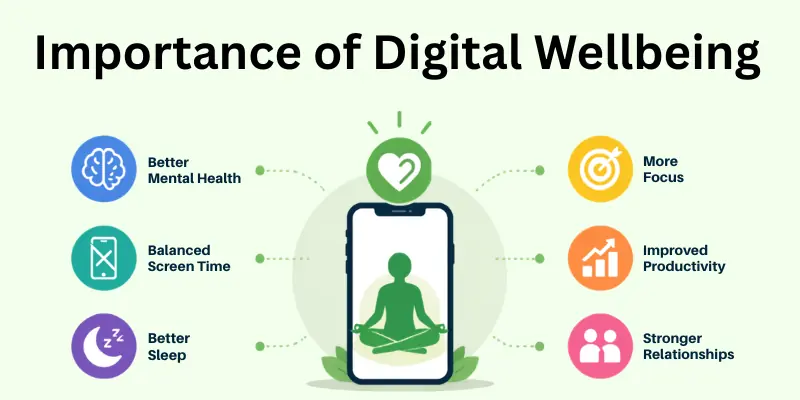
Whether you are using Samsung Digital Wellbeing, OnePlus Digital Wellbeing, or the default Google Digital Wellbeing system, the goal is the same. These tools help you understand how much time you spend on your phone and how it affects your daily routine.
Some may require additional sign-up using your basic info, like your full name (e.g., Malyha Mannan), email, and age, before you can start using them.
My Personal Experience Using Digital Wellbeing
When I first started using Digital Wellbeing, I was surprised by how much time I spent on my smartphone every day.
I initially thought I only checked my phone for a few minutes between important activities. However, the screen time dashboard showed me how quickly those small moments added up.
The most useful part was identifying which applications were taking most of my attention. I started using app timers and Focus Mode to manage unnecessary distractions. After using these features consistently, I noticed several positive changes in my daily routine.
Here are some improvements I experienced:
- Better Focus: I became more aware of unnecessary distractions while working.
- Time Management: I started paying closer attention to how I spent my time.
- Reduced Scrolling: App timers helped me control unnecessary social media usage.
- Improved Routine: Bedtime settings encouraged me to reduce nighttime phone activity.
- Better Awareness: I became more conscious of my smartphone habits.
For me, the biggest benefit was not simply reducing screen time. It was learning to use my phone more intentionally.
Advantages and Disadvantages of Digital Wellbeing
Every digital tool has its own benefits and limitations, and Digital Wellbeing is no different. Although it provides useful features for managing smartphone habits, it also has some limitations that users should understand.
Let's explore both sides.
Advantages of Digital Wellbeing
Digital Wellbeing offers several benefits for people who want to manage their smartphone usage and reduce digital distractions.
Here are its main advantages:
- Better Time Management: Helps you understand how much time you spend on different applications.
- Improved Productivity: Focus Mode reduces unnecessary interruptions during important activities.
- Healthier Sleep Routine: Bedtime Mode helps reduce certain nighttime phone distractions.
- Greater Awareness: Usage reports help you identify unhealthy smartphone habits.
- Easy to Use: Its basic features are simple enough for beginners.
- Better Parental Supervision: Supported parental controls help families manage children's digital activities.
Disadvantages of Digital Wellbeing
Despite its useful features, Digital Wellbeing also has some limitations. Understanding these drawbacks can help you set realistic expectations.
Here are some common disadvantages:
- Limited Device Support: Available features may differ between Android devices and software versions.
- Requires Self-Control: The app cannot force you to follow healthy digital habits.
- Limited Monitoring: It mainly focuses on supported device activity rather than every aspect of your digital life.
- Possible Restrictions: Strict app timers may interrupt activities when you need additional application access.
- Different Interfaces: Settings and available features may vary between smartphone manufacturers.
- Not a Complete Solution: It cannot independently solve serious problems related to excessive technology use.
Common Digital Wellbeing Mistakes Beginners Should Avoid
Digital Wellbeing can help you develop better smartphone habits, but using it incorrectly may reduce its effectiveness.
Here are some common mistakes you should avoid:
- Setting Unrealistic Limits: Reducing your screen time too quickly can make it difficult to maintain new habits.
- Ignoring Usage Reports: Checking your dashboard without making improvements will not change your digital habits.
- Disabling Every Notification: Turning off all notifications may cause you to miss important updates.
- Depending Only on App Timers: Timers are helpful, but developing personal discipline is equally important.
- Ignoring Bedtime Settings: Continuing to use your phone late at night can make it harder to maintain a healthy routine.
- Not Reviewing Progress: Failing to check your weekly usage makes it difficult to identify improvements.
- Confusing Screen Time with Productivity: Not all screen time is unnecessary. Work, education, and learning also require digital devices.
Remember, the goal is not to stop using your smartphone. It is to use it in a more balanced and meaningful way.
Digital Wellbeing Myths
Many smartphone users have misunderstandings about Digital Wellbeing and its actual purpose.
Before moving forward, let's clear up some common myths. Here are a few Digital Wellbeing myths beginners should understand:
- Myth 1: Digital Wellbeing Blocks All Distractions: It provides tools to manage selected distractions, but it does not automatically control every activity.
- Myth 2: Digital Wellbeing Is Only for Children: Adults, students, professionals, and other smartphone users can also benefit from it.
- Myth 3: Less Screen Time Always Means Better Productivity: Screen time depends on how you use your device. Educational and professional activities also require screen time.
- Myth 4: Digital Wellbeing Is a Separate Paid Application: Its built-in features are available without a separate subscription on supported Android devices.
- Myth 5: App Timers Permanently Block Applications: App timers generally pause selected applications after their daily limits are reached.
- Myth 6: Digital Wellbeing Automatically Improves Sleep: Bedtime settings can reduce distractions, but healthy sleep habits also require personal effort.
- Myth 7: Every Android Phone Has Identical Features: Available features and settings can differ depending on the manufacturer and Android version.
Understanding these myths will help you use Digital Wellbeing more effectively.
Who Should Use the Digital Wellbeing App?
Digital Wellbeing is useful for almost anyone who wants to understand and manage their smartphone habits. However, some users may benefit from its features more than others.
Here are some examples:
- Students: Can use Focus Mode to reduce distractions while studying.
- Remote Workers: Can manage notifications and avoid unnecessary mobile interruptions.
- Social Media Users: Can set app timers to control excessive scrolling.
- Parents: Can use supported parental control tools to manage children's device usage.
- Professionals: Can monitor their screen time and improve daily productivity.
- Gaming Enthusiasts: Can become more aware of how much time they spend playing mobile games.
- Everyday Smartphone Users: Can understand their digital habits and develop healthier routines.
If you use a smartphone regularly, Digital Wellbeing can help you become more aware of your daily technology usage.
Is Digital Wellbeing Available on All Android Phones?
Digital Wellbeing is available on many modern Android smartphones, but its availability and features depend on the device manufacturer, Android version, and software support.
Google Pixel devices and many other Android smartphones include Digital Wellbeing settings.
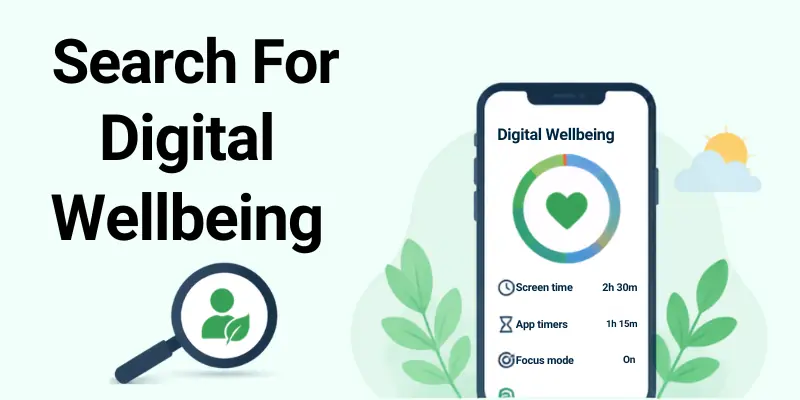
Samsung, OnePlus, and other manufacturers may also provide similar features through their device settings. If you cannot find Digital Wellbeing on your phone, try the following:
- Open your phone's Settings.
- Search for Digital Wellbeing.
- Check the available device features.
- Look for software updates if necessary.
- Check whether your device supports the feature.
You can also check the Google Play Store for supported Digital Wellbeing applications and related tools.
How to Start Using Digital Wellbeing Today
Getting started with Digital Wellbeing is simple. You do not need advanced technical knowledge to use its basic features.
Follow these steps:
- Step 1: Open Settings: Open the Settings application on your Android smartphone.
- Step 2: Find Digital Wellbeing: Search for Digital Wellbeing or Digital Wellbeing and Parental Controls.
- Step 3: Open Your Dashboard: Check your daily screen time, app usage, notifications, and phone unlocks.
- Step 4: Set App Timers: Select applications that consume too much of your time and create suitable daily limits.
- Step 5: Enable Focus Mode: Choose distracting applications and pause them when you need to concentrate.
- Step 6: Set Up Bedtime Mode: Configure your bedtime schedule and select the settings that help reduce nighttime distractions.
- Step 7: Review Your Progress: Check your usage regularly and make small improvements to your daily habits.
Remember, you do not need to change everything in one day. Start with small improvements and build better digital habits over time.
Future of Digital Wellbeing
Now that we have explored what Digital Wellbeing is, how it works, and its main features, let's look at what the future may hold for digital wellness tools.
As technology continues to develop, managing digital habits will become increasingly important. Smartphone manufacturers and technology companies are likely to continue improving tools that help people understand their device usage and manage distractions.
Here are some possible developments in digital wellness:
- AI-Powered Insights: Artificial intelligence may help users understand their digital habits through more personalized usage insights.
- Smarter Notifications: Future tools may provide better options for organizing notifications and reducing unnecessary interruptions.
- Personalized Recommendations: Digital wellness applications may offer suggestions based on individual usage patterns.
- Improved Parental Controls: Families may receive more flexible options for managing children's digital activities.
- Better Sleep Support: Digital wellness tools may provide more useful features for managing nighttime device usage.
- Cross-Device Management: Users may get better ways to manage their digital habits across multiple supported devices.
- More Focus Features: Future tools may offer additional options for reducing distractions during work, study, and personal activities.
These are possible areas of development rather than confirmed features or release plans. The overall direction is to make technology more supportive of people's everyday lives.
Conclusion
In this guide, we have explored what is the Digital Wellbeing app, how it works, its main features, advantages, disadvantages, and the importance of developing healthier smartphone habits.
If you frequently struggle with unnecessary scrolling, constant notifications, or excessive screen time, my recommendation is to start using Digital Wellbeing and explore its features. Begin with the screen time dashboard, set realistic app timers, and use Focus Mode whenever you need better concentration.
Remember, Digital Wellbeing is not about avoiding technology or completely restricting smartphone usage. It is about understanding your habits and creating a healthy balance between your digital and personal life.
Before you leave, make sure to check the FAQs section below, where we answer some common questions about Digital Wellbeing.
FAQs
Here are some of the most commonly asked questions about the Digital Wellbeing app:
The Digital Wellbeing app helps Android users monitor and manage their smartphone usage. Its main purposes include:
- Tracking daily screen time.
- Managing application usage limits.
- Reducing unnecessary distractions.
- Improving digital habits.
Yes. Digital Wellbeing's built-in features are generally available without a separate subscription on supported Android devices. You can access them through your phone's Settings.
Yes. Digital Wellbeing is a built-in Android feature designed to help users manage their device usage. You should still review your device's privacy settings and understand what usage information the feature collects.
Yes. Many Samsung smartphones include Digital Wellbeing features.
You can usually find them under Settings, although the available options may vary depending on your device and software version.
No. Digital Wellbeing helps you monitor and manage your screen time, but you need to make conscious decisions to improve your smartphone habits. App timers and Focus Mode can help you control unnecessary usage.
Digital Wellbeing focuses on helping users understand and manage their own smartphone habits. Parental Controls provide additional tools that allow parents to manage children's device usage, app access, and content restrictions.
Yes. Many basic Digital Wellbeing features, such as screen time tracking and app timers, work directly on your device without requiring an internet connection.
However, some related services and parental control features may require internet access.
The available options depend on your device and Android version.
You may be able to adjust its settings, turn off certain features, or disable related permissions. Some devices may not offer an option to completely disable the built-in feature.
Focus Mode is a feature that helps you avoid distractions by temporarily pausing selected applications. It is useful when studying, working, reading, or completing important tasks.
Apple provides similar digital wellness features through Screen Time on iPhones.
Although its features are not identical to Android's Digital Wellbeing, it allows users to monitor usage, set app limits, and manage screen habits.
- ✔ Be Respectful
- ✔ Stay Relevant
- ✔ Stay Positive
- ✔ True Feedback
- ✔ Encourage Discussion
- ❌ Avoid Spamming
- ❌ No Fake News
- ❌ Don't Copy-Paste
- ❌ No Personal Attacks