
Quality Engineering Software: Complete Guide & Practices
When I first started working in software development, I realized that building a product is only half the journey. Ensuring that it works perfectly and meets user needs is equally critical.
That is where quality engineering comes in. In this quality engineering software guide, I will take you through the concept of quality engineering software, the benefits of using it, the types of tools available, and step-by-step instructions to integrate it into your workflow.
By the end of this guide, you will know exactly how to choose the right tools, improve your testing process, and reduce defects before they impact your users.
Understanding Quality Engineering Software
Quality engineering software goes beyond traditional testing. It is a proactive approach to ensure that software meets both business and user expectations.
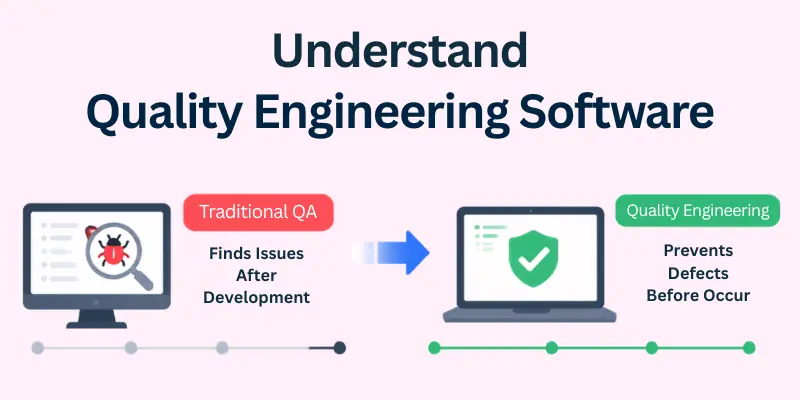
Unlike basic QA, which often detects issues after development, quality engineering focuses on preventing defects before they occur.
Here are the core aspects we will cover in this section:
- Test Automation Tools
- Performance and Load Testing Software
- Defect Tracking Systems
- Code Quality Analysis Tools
- Resource and Environment Management Tools
Let us cover all these in detail.
1. Test Automation Tools
Automation is the backbone of modern quality engineering. In my experience, automation helps teams catch repetitive bugs and accelerates the testing process.
Why it matters:
- Speeds up repetitive testing tasks
- Reduces human errors in testing
- Ensures consistent results across platforms
Popular tools include:
- Selenium
- TestComplete
- Ranorex
Using test automation saves time, increases accuracy, and allows the team to focus on more complex tasks.
2. Performance and Load Testing Software
Performance issues can ruin a user experience and harm your product’s reputation. I always recommend testing software under real-world conditions before release.
Benefits:
- Simulates multiple users accessing the system simultaneously
- Measures response times and resource utilization
- Identifies bottlenecks before deployment
Popular tools include:
- Apache JMeter
- WebLOAD
- WAPT
These tools help ensure your software performs well under any load.
3. Defect Tracking Systems
Defect tracking systems are essential for organized QA processes. They help teams log, prioritize, and resolve issues efficiently.
Why they are valuable:
- Provides clear visibility of all known defects
- Assigns tasks to the right team members
- Generates detailed reports for management
Popular tools include:
- Jira
- DoneDone
- BugHerd
A good defect tracking system ensures no bug is forgotten, improving product quality and team accountability.
4. Code Quality Analysis Tools
Analyzing code quality is critical for long-term maintainability and security. I personally always include these tools in my workflow to prevent future technical debt.
Key benefits:
- Detects vulnerabilities and poor coding patterns
- Ensures compliance with coding standards
- Provides recommendations for improvement
Popular tools include:
- SonarQube
- CodeClimate
- ESLint
Maintaining clean code prevents costly errors and supports sustainable development.
5. Resource and Environment Management Tools
Managing test environments, servers, and resources efficiently is often overlooked. I have found that a well-managed environment speeds up testing and reduces failures.
Benefits:
- Enables testing across multiple environments simultaneously
- Monitors server performance and resource usage
- Automates environment setup for repeatable tests
Popular tools include:
- Docker
- Kubernetes
- BrowserStack
These tools ensure your tests are accurate and replicable across different platforms.

Benefits of Quality Engineering Software
Implementing quality engineering software can transform your workflow and product quality.
Top benefits include:
- Save time and costs: Detect defects early to avoid expensive fixes
- Minimize errors: Reduce manual testing mistakes
- Increase productivity: Automate repetitive tasks so the team can focus on critical issues
- Enhance competitiveness: Release high-quality software faster than competitors
In my experience, teams that embrace quality engineering see measurable improvements in both efficiency and customer satisfaction.
Choosing the Right Software
Choosing the right quality engineering software can feel overwhelming because there are so many options.
One important approach I always recommend is to hire web test automation engineers if your team lacks expertise in automated testing. They can guide the selection of tools, implement automation frameworks, and ensure your team uses the software efficiently.
Important factors to consider:
- Certification: Ensure the tool complies with ISO 9000 or similar standards.
- Integration: Check compatibility with the existing tools in your workflow.
- Flexibility: Choose software that can adapt as your product grows.
- Budget: Match tools to your team’s experience and financial resources.
- Expert Guidance: Hiring experienced engineers can save time and avoid costly mistakes.
Selecting wisely prevents wasted effort and ensures smooth adoption of your quality engineering tools.

How to Integrate Quality Engineering Software
Integrating new software into your workflow should be systematic and personalized.
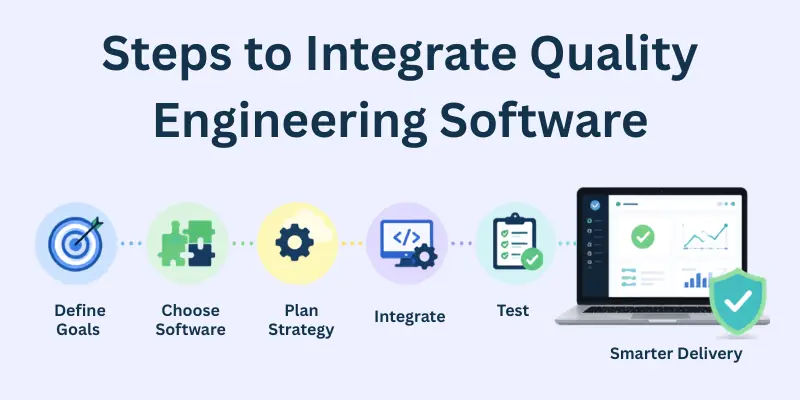
Here’s my step-by-step approach:
Step 1: Identify the right tools - Focus on what your team truly needs, whether for load testing, defect tracking, or code analysis.
Step 2: Train your team - A tool is only effective if the team knows how to use it properly. Training ensures everyone benefits fully.
Step 3: Optimize processes continuously - Review workflows, add new settings, and refine methods over time. Continuous improvement maximizes results.
By following these steps, you reduce risks and improve overall software quality.
Best Practices in Quality Engineering
Adopting best practices makes your quality engineering efforts more effective and sustainable. In my experience, these strategies consistently improve software quality:
Key practices:
- Conduct testing early and throughout the development cycle to catch defects sooner.
- Perform regular code reviews and audits to maintain code quality.
- Document test cases, results, and lessons learned for future reference.
- Automate repetitive and time-consuming tasks to save time and reduce errors.
- Collaborate closely between QA engineers, developers, and product managers to ensure alignment.
- Continuously update your testing tools and frameworks to match evolving project needs.
- Encourage a culture of quality within your team, where everyone values defect prevention.
Following these practices ensures efficient, reliable, and scalable quality engineering processes.
Final Note
In this quality engineering software guide, we have explored key tools, integration methods, and best practices.
I hope this guide helps you streamline testing, prevent defects, and release high-quality software confidently. Remember, investing in quality engineering software is not just about tools, it is about creating a culture of quality in your team.
Personally, I recommend starting with test automation and defect tracking to see immediate improvements in your workflow.
- ✔ Be Respectful
- ✔ Stay Relevant
- ✔ Stay Positive
- ✔ True Feedback
- ✔ Encourage Discussion
- ❌ Avoid Spamming
- ❌ No Fake News
- ❌ Don't Copy-Paste
- ❌ No Personal Attacks