
What is eSIM? Meaning, How It Works, Shape, Uses & Future
Have you ever seen the term “eSIM” on your phone settings and thought, what is eSIM and why is everyone talking about it? Many people get confused the first time they hear it.
Some think it is a virtual SIM, others believe it is a special app, and some people even search online just to understand the eSIM meaning. The truth is, it is much simpler than it sounds.
Let me clear it up for you. I work with eSIM technology, and I explain this question to people almost every day.
So guys, just dig into this guide to know all the ins and outs of eSim , what it is, how eSim works and much more!
What is eSIM?
An eSIM stands for embedded Subscriber Identity Module. It is a small chip that is already built inside your phone, tablet, or smartwatch. Unlike a traditional SIM card, you do not need to insert or remove it from your device.
You simply download a mobile plan from your carrier and activate it digitally. In simple words, an eSIM works like a virtual SIM that connects your device to a mobile network without using a physical card.
How Does eSIM Work?
Now you have an understanding of what eSIM is, but they still wonder how eSIM works in real life. The process is actually very simple. You do not need to insert a SIM card or visit a mobile shop. Everything happens digitally on your phone.
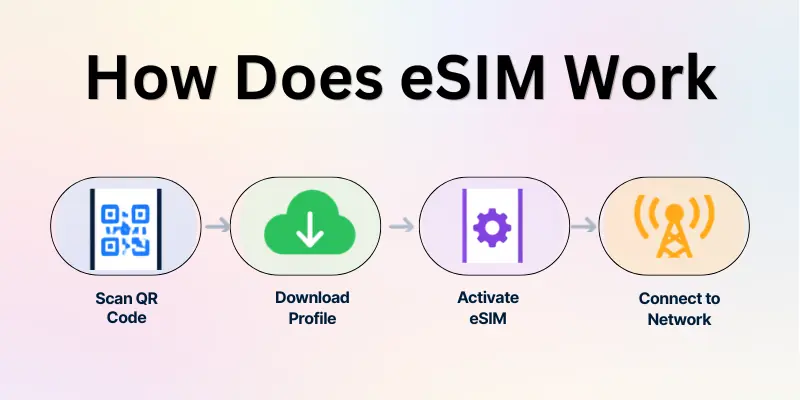
In this section, I will guide you step by step so you can clearly understand how eSIM works inside your device.
How the eSIM Activation Process Works
- Choose an eSIM provider: First, you select a mobile carrier or travel eSIM provider that offers a data plan.
- Purchase an eSIM plan: After choosing a plan, the provider sends you an activation QR code or installation details.
- Scan the QR code on your device: Open your phone settings and scan the QR code to start the installation.
- Download the carrier profile: Your phone downloads the network profile directly into the built-in eSIM chip.
- Activate the mobile network: Once the profile installs, your device connects to the carrier network automatically.
- Start using mobile data and calls: After activation, your eSIM works just like a normal SIM card for data, calls, and messages.
What Does eSIM Look Like?
Many people ask this question after learning about eSIM. They expect to see a small card like the SIM they usually insert in their phone.
But the truth is different. An eSIM is not a removable card that you can hold in your hand. It is a small chip that is permanently built inside your device’s motherboard.
Because the chip is already inside the device, you cannot remove it or replace it. Instead of inserting a SIM card, you activate your mobile plan by downloading a carrier profile directly to the eSIM.
Quick Points About What eSIM Looks Like
- eSIM is a tiny electronic chip inside the phone.
- It is soldered onto the device motherboard during manufacturing.
- You cannot remove or physically see it like a SIM card.
- It works digitally through QR code or carrier profile download.
- The phone settings manage the eSIM instead of a SIM tray.
Why Use eSIM?
Here are the main uses of eSIM:
- Easy activation: You can activate a mobile plan within minutes by scanning a QR code.
- No physical SIM card needed: Since the SIM is already built into the phone, there is no risk of losing or damaging a SIM card.
- Multiple network profiles: One device can store several carrier plans, so you can switch networks easily.
- Perfect for international travel: Travelers can install local data plans before arriving in another country.
- Useful for travel connectivity: If you are visiting like France, you can activate an eSIM for France and connect to local networks instantly without buying a SIM card at the airport.
- Keep your main number active: You can use your regular SIM for calls while using eSIM for mobile data.

Devices That Support eSIM
Here are some common devices that support eSIM:
1. Smartphones
Most new smartphones come with eSIM support.
- iPhone XS, XS Max, and XR
- iPhone 11, 12, 13, 14, and newer models
- Samsung Galaxy S20, S21, S22, S23 series
- Samsung Galaxy Z Fold and Z Flip series
- Google Pixel 3 and newer Pixel models
2. Smartwatches
Many smartwatches use eSIM to connect to mobile networks.
- Apple Watch (Cellular models)
- Samsung Galaxy Watch LTE versions
- Google Pixel Watch
3. Tablets
Some tablets also support eSIM connectivity.
- Apple iPad Pro
- iPad Air (newer models)
- iPad Mini with cellular support
4. Laptops
A few modern laptops also include eSIM technology.
- Microsoft Surface Pro series
- Lenovo ThinkPad models with cellular support
- Some HP and Dell laptops with LTE connectivity
These devices allow users to download and activate a mobile plan digitally, which makes switching carriers or using travel data plans much easier.
eSIM vs Physical SIM
Both eSIM and physical SIM cards connect your phone to a mobile network. The main difference is how they are installed and used in the device.
eSIM works digitally, while a physical SIM card must be inserted into the phone. Below are some simple points that show the difference between the two.
- Installation: eSIM installs digitally through a QR code or activation code, while a physical SIM must be inserted into the SIM tray.
- SIM Card Type: eSIM is a built-in chip inside the device, while a physical SIM is a removable plastic card.
- Switching Networks: With eSIM you can switch carriers by downloading a new profile, while a physical SIM requires changing the SIM card.
- Travel Convenience: eSIM is easier for travel because you can install international data plans online, while physical SIM cards often require buying a new SIM in each country.
- Risk of Loss or Damage: eSIM cannot be lost because it is inside the device, while a physical SIM card can be misplaced or damaged.
- Multiple Plans: eSIM allows multiple network profiles on one device, while a physical SIM usually supports only one active card at a time.

Is eSIM Safe?
Yes, eSIM is very safe. Because it is built inside your device, it cannot be removed or lost like a physical SIM card. All eSIM profiles are protected by carrier encryption and secure authentication.
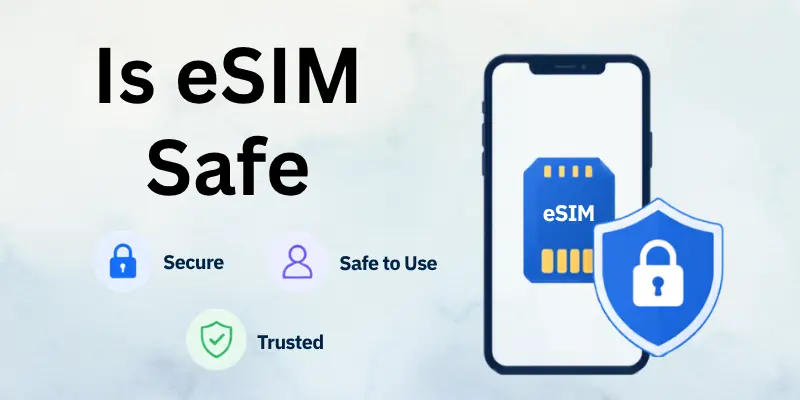
Remote activation and digital management also make it harder for hackers to tamper with your mobile plan. Overall, eSIM gives you secure and reliable mobile connectivity without the risks of a physical SIM.
Quick Safety Points
- Built-in chip cannot be removed or stolen.
- Mobile carrier encrypts all eSIM profiles.
- Activation requires secure QR code or activation code.
- Keeps your data and mobile number safe.
Future of eSIM
The future of eSIM is growing fast. More smartphones, tablets, smartwatches, and even laptops are coming with built-in eSIM support. Mobile carriers worldwide are offering digital plans, and travelers can now use eSIM for France or any country without worrying about physical SIM cards.
Soon, many devices may completely remove SIM trays, making eSIM the standard for mobile connectivity.
Future Trends
- More devices will include eSIM by default.
- Travel eSIM services will become easier and cheaper.
- Multiple network profiles on one device will become normal.
- Physical SIM cards may gradually disappear.
Final Thoughts
In this guide, we have covered what is eSIM in great detail. From its definition, how it works, what it looks like, to its benefits, travel uses, and supported devices’ you now know why eSIM is the future of mobile connectivity.
My Personal Recommendation:
If you travel often or want a stress-free mobile experience, I highly recommend switching to eSIM. It saves time, keeps your main number active, and allows you to connect to local networks anywhere without extra hassle.
Personally, I use eSIM on my phone for both work and travel, and it has made staying connected so much easier and faster.
FAQs
Here are some of the most frequently asked questions related to "What is eSIM?":
eSIMs allow you to activate local mobile plans digitally without a physical SIM. You simply download the carrier profile and start using data and calls instantly. This makes travel connectivity much easier and faster than traditional SIM cards.
To get an eSIM, check if your device supports it, choose a carrier or eSIM provider, and purchase a plan. You then scan a QR code or enter an activation code to install it. The setup is quick and simple, making eSIM setup hassle-free.
eSIM offers convenience, multiple network profiles, and instant activation. You do not need to carry or swap physical SIMs, which is perfect for hassle-free travel. It also keeps your mobile connectivity secure and reliable.
Yes, eSIM works in many countries without changing your SIM card. You can download a local plan for data and calls, making it a great roaming alternative for travelers.
Absolutely! Travelers can activate an eSIM for France before or after arriving. This allows you to stay connected to local networks without buying a physical SIM at the airport.
A travel eSIM is a digital SIM designed for international use. It allows you to connect to local networks and use mobile data abroad without worrying about high roaming charges.
Yes, eSIM provides instant access to networks in different countries. It ensures mobile connectivity abroad is reliable and simple to manage on one device.
Anyone who travels frequently for work or leisure can benefit. eSIM helps reduce SIM swaps and supports multiple carriers, making it a perfect eSIM for travelers solution.
Yes, eSIM is a digital SIM embedded in your device. It replaces the need for a physical card while providing full mobile functionality, including data, calls, and SMS.
eSIM allows travelers to download local plans instantly, avoiding expensive roaming fees. It is one of the best travel SIM solutions for people who want fast and easy mobile access abroad.
- ✔ Be Respectful
- ✔ Stay Relevant
- ✔ Stay Positive
- ✔ True Feedback
- ✔ Encourage Discussion
- ❌ Avoid Spamming
- ❌ No Fake News
- ❌ Don't Copy-Paste
- ❌ No Personal Attacks