
Webinar Analytics Guide: Complete Guide for Better Insights
Understanding how your webinars perform is essential if you want stronger outcomes, better engagement, and higher conversions. This webinar analytics guide will help you learn exactly what to track, how to analyze your results, and how to make continuous improvements.
You will also learn how to understand audience behavior, optimize your content, and create better webinar strategies in the future. By the end, this guide will give you a clear direction for building webinars that attract, retain, and convert your audience.
In this guide, we also use data in a simple and practical way so you can apply everything immediately. You will know which webinar metrics matter most, how to read engagement data, and how to use these insights to plan stronger events.
This webinar analytics guide works like a roadmap for creators, marketers, educators, and business owners who want to take webinar performance to the next level.
Why Webinar Analytics Are Essential for Your Strategy
Before you improve your webinars, you need to understand how they perform. Webinar analytics provide real signals about what works and what needs improvement.
Without reviewing these insights, you may repeat mistakes, miss opportunities, and waste time on formats that do not match your audience’s interests.
Here are six clear and simple reasons why webinar analytics matter:
- You understand your audience’s behavior
- You learn which topics attract the most attention
- You see how long people stay
- You measure conversion outcomes
- You identify areas that need improvement
- You find ways to increase ROI
By watching metrics like watch time, engagement, and drop-off moments, you can see which parts of your webinar captured attention. You can also discover which segments need better content or stronger delivery.
When you make data your guide, your overall webinar strategy becomes smarter, faster, and more impactful.
Strategic Advantages of Using Webinar Data
Here are some important benefits of using webinar data in your workflow. Below, you will also see how each advantage impacts your future webinars in a simple and practical way.
- Better Decision Making: You make decisions based on audience behavior, not guesses. This helps you decide which topics to repeat, which formats to improve, and which speakers perform best.
- Higher Engagement: Webinar platforms track polls, Q&A activity, chats, and reactions. These signals show what captured your audience’s attention. When you understand these patterns, you can plan more interactive and meaningful sessions.
- Stronger ROI: Webinars are cost-effective. When you study performance consistently, you discover ways to increase conversions and generate better results from each session.
- Smarter Audience Segmentation: You can segment audience groups by industry, job title, or engagement level. This helps you plan relevant follow-ups and laser-focused next webinars.
6 Key Webinar Metrics to Track for Stronger Performance
Below are the six most essential webinar metrics your team must track.
1. Attendance Rate
This metric shows how many registrants actually attended your webinar. It helps you judge the strength of your promotional efforts, your landing page, and your signup promise.
Key insights from this metric:
- How attractive your topic was
- How effective your emails were
- How strong your registration flow was
- How well you targeted your audience
2. Engagement Level
Engagement reflects activity during polls, Q&A, chat messages, reactions, and surveys.
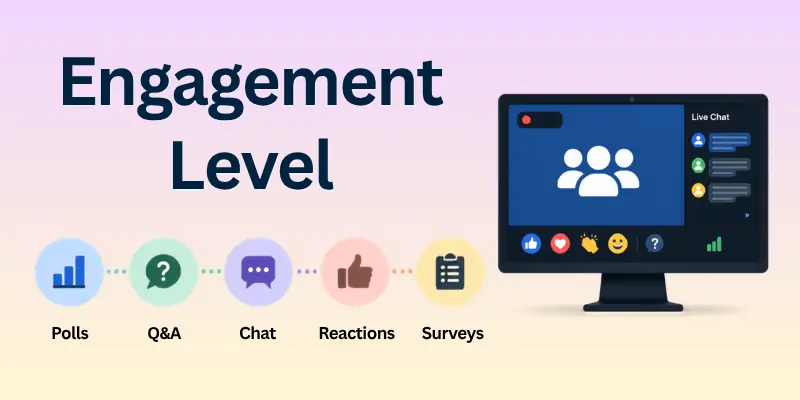
High engagement means your content captured attention and your delivery worked well.
What engagement helps you understand:
- Which moments were most interesting
- Which speakers created energy
- How the audience responded to interactive elements
- What to improve for the next webinar
3. Conversion Rate
This metric shows how many attendees took the action you wanted. Conversions may include:
- Booking a call
- Signing up for a product
- Downloading a resource
- Requesting more details
Tracking conversions helps you understand how effectively your webinar aligned with your business objectives.

4. Attendee Engagement Signals
This includes message activity, survey responses, link clicks, and reaction levels. These signals help you measure:
- User interest
- Readiness to take action
- Potential lead quality
- Audience intent
This metric reveals which audience groups are most likely to convert into customers.
5. Watch Time
Watch time tells you exactly how long people stayed in your webinar. If your average watch time is high, it means your content was strong.
Watch time helps you:
- Identify weak sections
- Study audience drop-off
- Review presentation flow
- Improve content structure
6. Live vs On-Demand Views
Live data shows how many attended in real-time. On-demand data shows how many watched the replay. Many platforms let you compare both.
This metric reveals:
- When your audience prefers to watch
- How your timing affects attendance
- How valuable your content is even after the live event

How to Evaluate Webinar Analytics
Here are three simple ways to evaluate your overall webinar analytics.
1. Use Analytics Dashboards
Webinar platforms provide dashboards that show:
- Total registrants
- Attendance
- Engagement data
- Feedback
- Conversion outcomes
These dashboards help you see all major performance signals in one place.
2. Identify Trends in Your Data
When you review data regularly, patterns start to appear.
Common trends include:
- Which topics attract more signups
- Which days and times work best
- Which speakers attract more engagement
- Which content formats drive more conversions
Identifying these trends helps you build a more predictable webinar strategy.
3. Integrate With Marketing Tools
Most platforms connect with CRM and automation tools. This helps your team:
- Score leads
- Personalize follow-ups
- Build smarter workflows
- Send targeted content
This makes the entire webinar process more efficient and more organized.
Advanced Ways to Use Webinar Data for Better Audience Insights
Before the final note, here is one more section that makes the guide complete.
You can use webinar data to understand your audience deeper than usual. When you study behavior patterns, you discover what your audience expects next. This helps you craft better educational flows and more relevant marketing sequences.
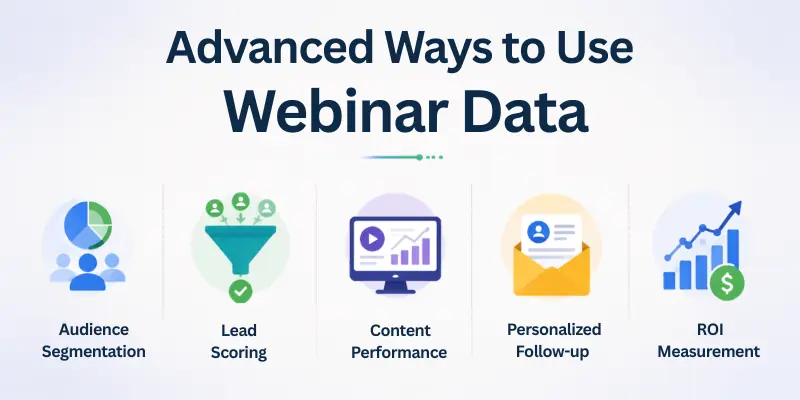
Here are powerful one-liner insights:
- Track which polls created the most reactions
- Study the drop-off timeline to improve content structure
- Review replay behavior to identify popular chapters
- Use chat data to understand real user concerns
- Track questions to shape your next webinar topic
These insights help you create webinars that feel personal and valuable.
Some Common Questions about Webinar Analytics
Here are some of the most commonly asked questions related to the webinar analytics' importance:
Q: What is webinar analytics?
A: Webinar analytics involves tracking and analyzing webinar performance metrics. These include attendance, engagement, and conversion rates. These insights help you understand audience behavior and improve future webinars.
Q: Which key metrics should I track?
A: Focus on attendance rate, watch time, engagement metrics (polls, chat, Q&A), and conversion rates. These key webinar metrics provide a clear view of webinar success.
Q: How can webinar analytics improve my strategy?
A: Webinar analytics helps you make data-driven decisions about content, scheduling, and follow-up. Analyze audience engagement and conversion data. That way, you can improve audience engagement and boost ROI.
Q: Do most webinar platforms include analytics?
A: Yes, most webinar platforms, including StealthSeminar, offer an analytics dashboard with robust analytics. These analytics tools help you evaluate webinar success. It also provides actionable insights for your marketing team.
Q: Why is watch time important?
A: Watch time reveals how long webinar attendees stay engaged with your webinar content. Higher watch times mean stronger audience understanding and better chances of achieving your webinar goals.
Parting Thoughts
Before we wrap up, I want to leave you with one simple reminder. Your webinar growth journey does not end here. Every insight you track and every improvement you make brings you closer to the results you want.
Let this webinar analytics guide be your companion whenever you feel unsure about what to measure or how to grow. Keep experimenting, keep learning, and keep showing up for your audience.
Thanks for reading, and I wish you nothing but clearer data, stronger engagement, and webinars you feel proud of.
- ✔ Be Respectful
- ✔ Stay Relevant
- ✔ Stay Positive
- ✔ True Feedback
- ✔ Encourage Discussion
- ❌ Avoid Spamming
- ❌ No Fake News
- ❌ Don't Copy-Paste
- ❌ No Personal Attacks